




.png?width=512&height=512&name=FlowFit_Flavicon%20(1).png)







Most teams know they need to localize their software. Fewer know what a good process actually looks like.
The difference between teams that ship localized releases on time and teams that scramble to patch translations after launch usually comes down to process, not people.
This article breaks down what a modern software localization process looks like step by step, so you can benchmark your own workflow and spot where things are breaking.
Key takeaways
- A good software localization process is continuous, automated, and embedded in development, not bolted on after release
- The biggest process failures come from skipping internationalization, working without visual context, and treating quality as a final step instead of an ongoing gate
- AI in 2026 doesn't replace the process. It accelerates it by handling first drafts, scoring quality, and routing content based on confidence
- Want to see what a modern software localization workflow looks like inside XTM? Take a product tour
What is the software localization process?
The software localization process is the sequence of steps that takes your product from single-language to multilingual. It covers everything from preparing your codebase, through translation and quality assurance, to deploying localized versions.
A good process runs continuously alongside development, not after it.
That last point is worth sitting with for a moment. The old model (build the product, hand it off for translation, wait, then release) is gone. It doesn't work for teams shipping weekly or daily.
And with 76% of consumers preferring products in their native language according to CSA Research, getting localized versions out fast isn't optional. It's how you compete.
Here's what the full process looks like at a high level:
| Stage | What happens | Who's involved |
|---|---|---|
| Internationalization | Codebase prepared for multiple locales | Developers |
| String extraction and sync | Translatable content flows to TMS automatically | Developers, TMS |
| Translation | Content translated with visual context | Translators, AI |
| Quality assurance | Automated scoring, terminology checks, brand safety | QA tools, AI |
| Review and approval | In-context review in actual UI | Reviewers, loc managers |
| Deployment | Localized builds ship with or alongside source | DevOps |
Key distinction: Translation is one step inside the software localization process. The process itself covers everything from code preparation to deployment, and a good one runs continuously.
It's also worth clarifying what "good" means here.
A good software localization process is automated where it should be, quality-gated at every step, and gives translators the context they need to do great work. If your translators are working from spreadsheets and your QA happens after release, the process has gaps.
How should you prepare your codebase?
Good localization starts in the code.
If your developers haven't externalized strings, supported flexible layouts, and handled locale-specific formatting, every downstream step becomes harder and more expensive. This is internationalization (i18n), and skipping it is the single most costly mistake teams make.
Think of i18n as the foundation. You don't see it when the process is running well. But when it's missing, everything built on top of it cracks.
The practical work involves a few key areas:
- UTF-8 encoding: Supports every script and character set globally, including Chinese, Arabic, and Cyrillic
- Flexible layouts: UI handles text expansion (German runs roughly 30% longer than English), contraction, and right-to-left scripts without breaking
- Locale-aware formatting: Dates, numbers, currencies, and addresses adapt per locale automatically
- No text in images: All visual text lives in translatable layers, not baked into graphics
- Strings externalized: Every user-facing string lives in a resource file (JSON, XLIFF, .strings for iOS, XML for Android), not hardcoded in the source
Here's a real scenario that plays out more often than you'd think.
A fintech company building a budgeting app hardcoded date formats as MM/DD/YYYY throughout the frontend. When they decided to launch in Germany and the UK, they had to refactor the entire date handling layer before a single word could be translated.
That rework took six weeks and delayed the launch by two months.
Did you know? Retrofitting internationalization into a codebase after development costs three to five times more than building it in from the start. The earlier you invest in i18n for string localization, the cheaper every subsequent language becomes.
What does a good translation workflow look like?
The best translation workflows are automated, context-rich, and continuous.
Strings sync from your codebase to your translation platform automatically. Translators work with visual context showing exactly where each string appears. And completed translations merge back into the build without manual file handling.
That's the goal. And here's how it works in practice.
When a developer pushes code containing new or modified strings, those strings automatically sync to a translation management system.
Platforms like Transifex by XTM integrate directly with GitHub, GitLab, and Bitbucket to make this happen.
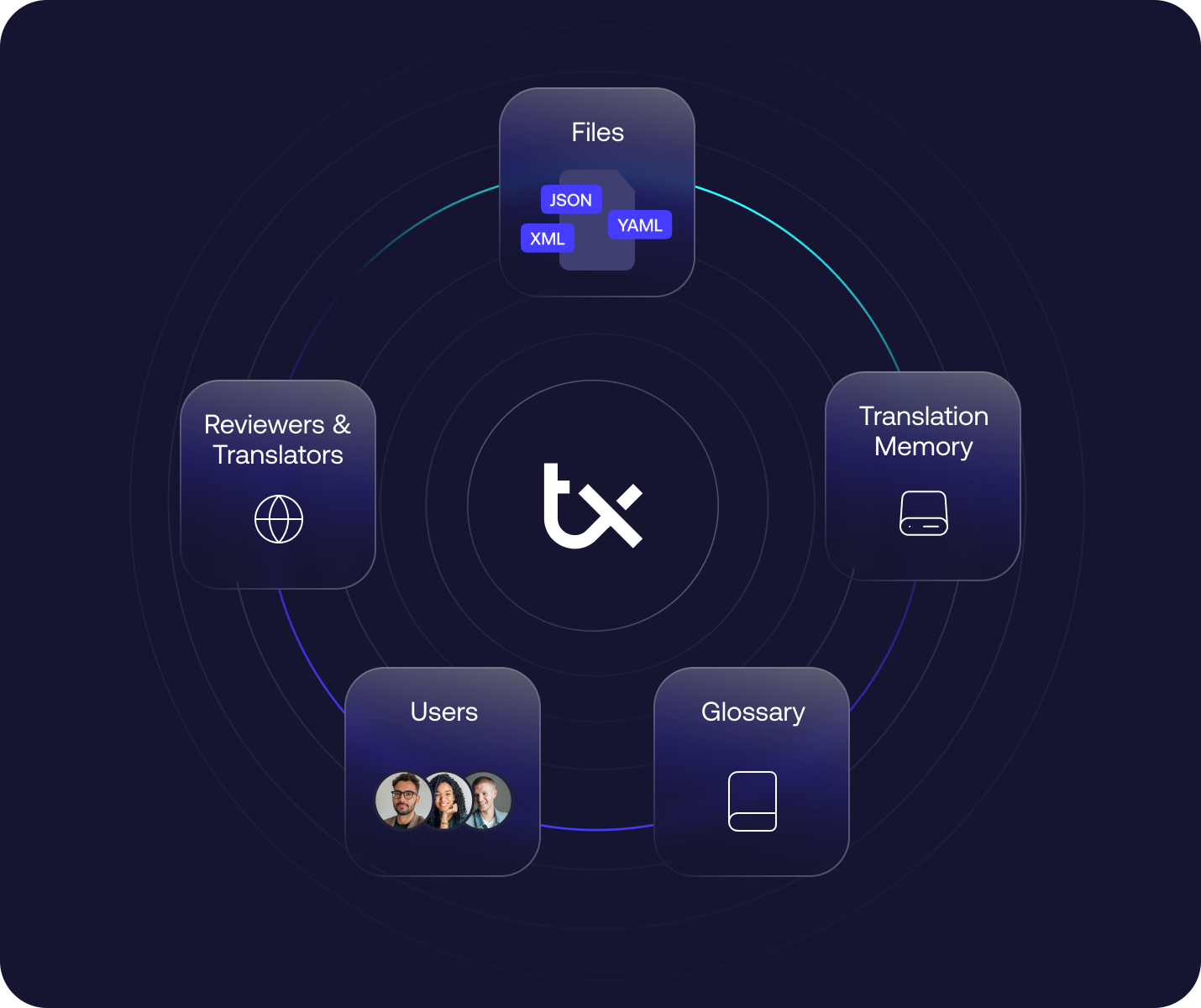
No one exports a file. No one emails a spreadsheet. The system handles it.
The difference between a manual and continuous workflow is dramatic:
| Manual workflow | Continuous workflow | |
|---|---|---|
| String extraction | Developer exports files manually | Auto-synced on code push |
| Translator context | Spreadsheet, no UI visibility | In-context visual preview |
| Delivery | Files emailed back, manually imported | Auto-merged via pull request |
| Speed | Weeks per language cycle | Hours to days |
On the translation side, context changes everything.
A translator looking at the string "Save" in a spreadsheet has no idea if it's a button label, a menu item, or a heading. Is it "save a file" or "save money"?
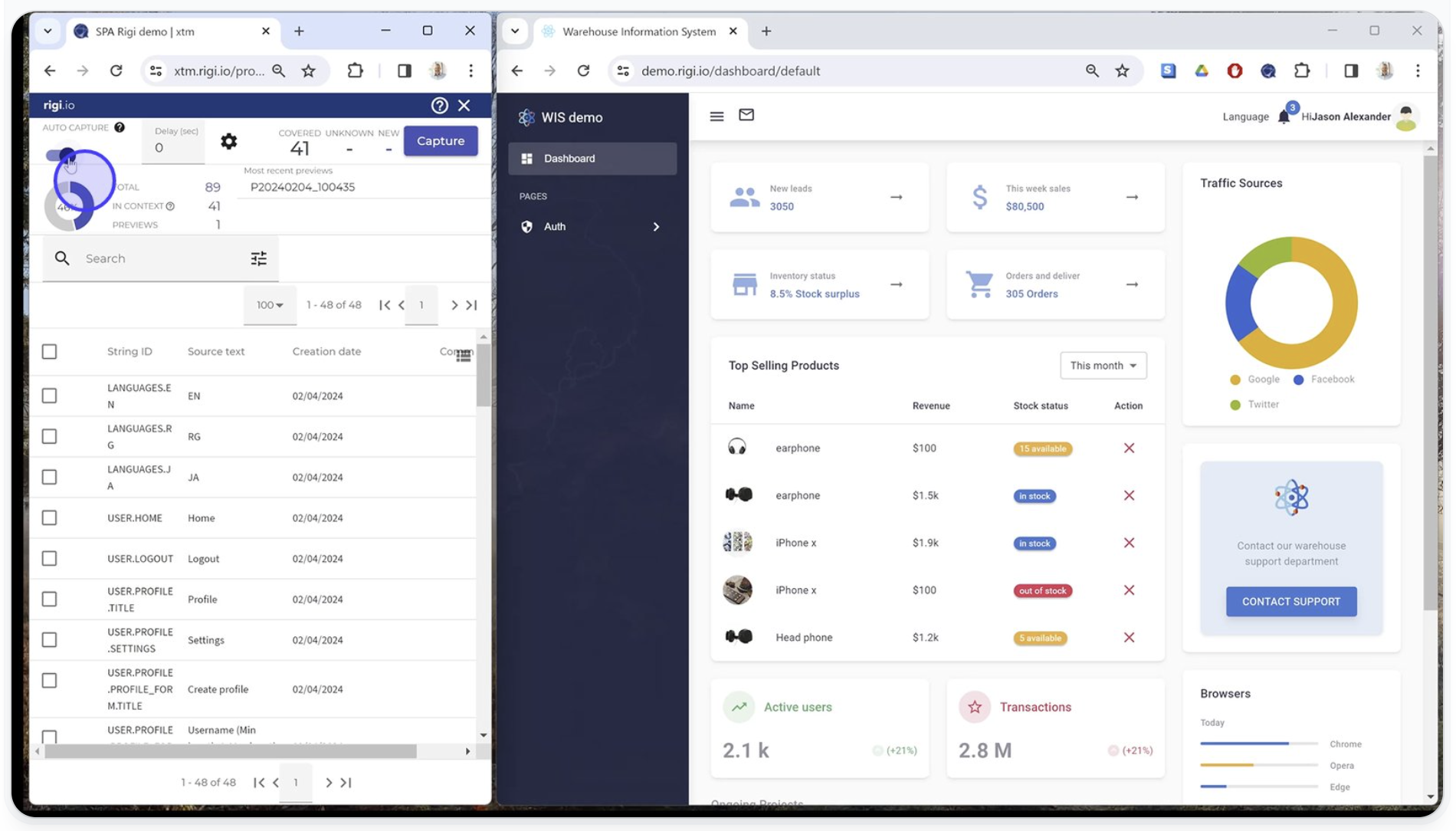
Visual context tools like Rigi by XTM show translators exactly how their text appears in the actual software UI. They see the button, the screen layout, the character limits. Quality goes up. Review cycles go down.
Translation memory and terminology management round out the workflow. TM ensures you never pay to translate the same string twice. A term base keeps your product vocabulary consistent across every language and every release.
Without these, a term like "workspace" might get translated three different ways across your app.
Key distinction: Translators working from spreadsheets without context will always produce lower quality than translators who can see their text in the actual UI. Visual context isn't a nice-to-have. It's a process requirement.
Where does quality assurance fit in the process?
Quality assurance should run throughout the software localization process, not just at the end.
The best teams build automated quality gates into every step: terminology enforcement during translation, AI-powered quality scoring on every segment, brand safety checks before review, and in-context visual validation before deployment.
When QA only happens at the end, it catches problems too late.
You find truncated German labels, inconsistent Finnish terminology, and a culturally inappropriate icon for your Japanese release, all after the build is supposedly "done." That means rework, delayed releases, and frustrated teams.
A better approach embeds quality gates at every stage:
| Process Stage | Quality gate | What it catches |
|---|---|---|
| During translation | Terminology enforcement, TM matching | Inconsistent terms, missed reuse opportunities |
| After translation | AI quality scoring (Intelligent Score) | Low-confidence segments, fluency and accuracy issues |
| Before review | Brand safety scan (Language Guard) | Offensive, biased, or non-compliant language in 90+ languages |
| During review | In-context visual preview (Rigi) | Truncation, layout breaks, context errors |
| Before deployment | Functional and linguistic testing | Broken UI, formatting errors, untranslated strings |
The AI-powered pieces are worth calling out.

Intelligent Score evaluates every translated segment using MQM analysis and assigns a confidence score. High-confidence content moves forward. Lower-confidence content gets flagged for human review.
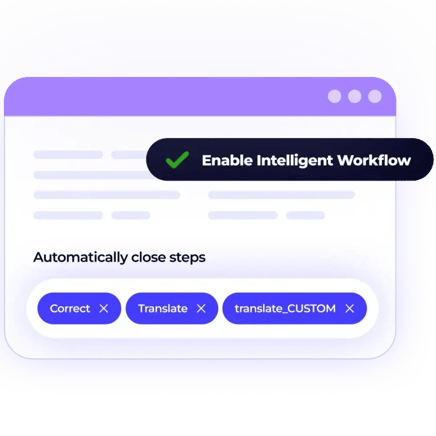
Intelligent Workflow handles this routing automatically, so your reviewers spend their time on segments that actually need attention instead of reviewing everything with the same depth.
Here are signs your QA process is broken:
- You find translation errors after release. Quality checks are happening too late in the pipeline
- Reviewers work from spreadsheets: They can't catch layout or truncation issues without visual context
- Every segment gets identical review depth: Routine UI strings don't need the same scrutiny as marketing copy
- No terminology governance: The same product term gets translated differently across features and releases
And Language Guard deserves a mention on its own. It scans translations for offensive, biased, or non-compliant language before content reaches reviewers.
For enterprise teams in regulated industries (life sciences, finance, ecommerce), this isn't optional. It's a compliance requirement.
How does AI change the software localization process?
AI doesn't replace the software localization process. It makes each step faster and smarter.
In 2026, AI handles:
-
First-draft translation with context awareness
-
Scores quality automatically
-
Routes content by confidence level, and flags brand risks before review. The process stays the same. The speed and consistency improve.
Here's where AI fits into each step:
| Process step | Without AI | With AI |
|---|---|---|
| Translation | Human translates every segment | AI drafts with SmartContext (aligned to TM and glossaries), human reviews critical content |
| Quality scoring | Manual review of all segments | Automated scoring, review by exception |
| Content routing | All content follows same review path | Routed by confidence level via Intelligent Workflow |
| Brand safety | Manual check (or skipped entirely) | Automated scan in 90+ languages |
| Post-editing | Full linguistic review of every MT segment | Intelligent Post-Editing applies targeted corrections, lighter review |
The practical split looks something like this. AI produces first-draft translations and scores every segment. Standard UI strings ("Cancel," "Settings," "Save changes") that score above your confidence threshold flow straight through. Marketing copy, onboarding flows, and regulated content get routed to human reviewers with specific quality feedback attached.
An enterprise team localizing a SaaS product into 15 languages might find that 65-70% of their UI strings pass quality thresholds automatically.
That frees their linguists to focus on the 30-35% that actually needs human judgment: the onboarding wizard, the pricing page copy, the error messages that need to sound reassuring rather than robotic.
According to Nimdzi's 2025 Language Technology Atlas, AI-assisted workflows are now the default for enterprise localization teams, not the exception.
Tip: Don't think of AI as replacing your process. Think of it as upgrading each step. The workflow stays the same. The manual effort at each stage drops significantly.
Teams using XTM's AI translation tools report saving up to 2,000 hours of manual work, because projects keep moving without constant human oversight on every segment.
What are the most common process mistakes?
Most software localization process failures come from the same handful of mistakes. Skipping internationalization, treating localization as a post-release task, translating without context, ignoring quality until the end, and managing each platform separately. All of these are preventable with the right process design.
Here are the fixes for the most common ones:
- Hardcoded strings: Externalize into resource files and automate sync from day one
- Post-release localization: Integrate into your CI/CD pipeline so localization runs alongside development, not after it
- No visual context: Use in-context preview tools so translators see the actual UI, not just isolated strings
- End-of-line QA: Build automated quality gates into every process step, not just the final one
- Separate platform workflows: Share string keys and translation memories across iOS, Android, and web to avoid duplicating work
- No terminology governance: Set up a shared term base and enforce it automatically during translation
- No translation memory: Without TM, you're paying to translate identical strings repeatedly across releases
For more on avoiding rework in practice, XTM has a detailed guide on how to eliminate rework in software localization, and their workflow automation tooling is built specifically to prevent these failures at scale.
Tip: The cheapest time to fix a localization process is before it breaks. Audit your current workflow against the steps in this article. If you're missing automation, visual context, or quality gates, those are the gaps to close first.
Final thoughts
The difference between a software localization process that works and one that constantly creates friction usually comes down to a few decisions made early.
-
Externalize strings from day one
-
Automate the connection between code and translation
-
Give translators visual context
-
Build quality gates into the process, not after it
-
Use AI to handle volume
None of this requires a massive organizational transformation. It requires choosing the right architecture and the right tooling, then running the process consistently.
XTM's composable globalization platform gives you everything in one place: Transifex for continuous CI/CD workflows, Rigi for visual in-context preview, and AI-powered quality scoring and routing that keeps your process moving without bottlenecks.
Get a demo to see what a modern software localization process looks like in practice.
FAQs
What is the software localization process?
The software localization process is the full sequence of steps for adapting your software product to different languages and markets. It starts with internationalizing your codebase, moves through string extraction, translation (with visual context), quality assurance, review, and deployment. A modern process runs continuously alongside development, not after it.
What is a localization process?
A localization process is the workflow an organization uses to adapt content, products, or software for a specific market. For software, this means adapting UI text, formats, visuals, and functionality to match local language and cultural expectations. The process typically involves preparation (i18n), translation, quality checks, review, and deployment, ideally automated and integrated into your CI/CD pipeline.
What are the best practices for localizing software and products?
The core best practices are: internationalize your codebase early (externalize strings, support flexible layouts, use UTF-8), automate string sync between your repository and TMS, give translators visual context so they see strings in the actual UI, build quality gates into every step (not just the end), share translation memories and term bases across platforms, and use AI to handle routine translations while humans focus on nuance and critical content.
What are the key localization steps?
The key steps are:
(1) internationalize your codebase
(2) extract and sync translatable strings to a TMS
(3) translate with visual context and AI assistance
(4) run automated quality checks (terminology, quality scoring, brand safety)
(5) review in-context in the actual UI
(6) deploy localized builds alongside your source release. The best teams repeat this cycle continuously with every code push.

Subscribe for More
Lorem ipsum dolor sit amet, consectetur adipiscing elit, sed do eiusmod tempor incididunt ut labore et dolore magna aliqua. Ut enim ad minim veniam, quis nostru.