




.png?width=512&height=512&name=FlowFit_Flavicon%20(1).png)







Every year, billions of apps get downloaded across the globe. But here's the problem: most of them only speak one language. That's a huge missed opportunity for any team with global ambitions.
Mobile app localization is the process of adapting your app's content, design, and functionality for users in different markets. It's not about swapping out button labels. You're reshaping the entire experience, from date formats and currencies to images, tone, and app store listings, so it feels native to every user.
This guide walks you through the full process, from preparing your codebase to launching in new markets. You'll learn how to build a content localization strategy that connects your mobile app to the rest of your global content operation.
Key takeaways
- Mobile app localization adapts every element of your app for specific markets, including UI, images, formats, and app store metadata. It's not just translation.
- Localized apps consistently outperform. Research shows that localized apps see significantly more downloads and stronger revenue in every market they enter.
- Visual context cuts errors dramatically. When translators see how their text appears in the actual UI, they produce more accurate work with fewer revision cycles.
- AI accelerates the process, but doesn't replace humans. Use AI for first drafts, quality scoring, and repetitive strings. Keep human review for brand voice and cultural nuance.
- Centralize your localization with a platform like XTM Cloud and Rigi to give translators visual context, automate workflows, and ship multilingual releases faster.
What is mobile app localization?
Think of translation as swapping words. Localization swaps the entire experience. It covers UI layout, imagery, cultural references, date formats, and even the tone of your error messages. The goal is an app that feels like it was built locally, not retrofitted.
Three terms come up constantly in this space, and they mean different things. Translation converts text. Localization adapts the product. Internationalization (i18n) is the engineering foundation that makes both possible.
Here's how the three relate:
| Translation | Localization | Internationalization | |
|---|---|---|---|
| Focus | Text conversion | Full experience adaptation | Code architecture |
| Scope | Words and phrases | UI, images, formats, culture | String handling, layouts, encoding |
| When | During localization | After i18n is complete | During development |
| Who | Translators | Localization team + translators | Developers |
When you localize a mobile app, you're touching UI strings, images, date and time formats, currency symbols, push notifications, in-app content, and app store metadata. All of it needs to feel right for the target market.
Building a clear localization strategy upfront saves you from expensive rework later. It also helps align your mobile app localization with your broader global content efforts.
Why does mobile app localization matter?
The business case for mobile app localization is strong. Across industries, localized apps consistently outperform their English-only counterparts in downloads, engagement, and revenue.
Research from Distomo found that localized apps saw a 128% increase in downloads per country, along with a 26% boost in revenue per country. Those aren't marginal gains.
Key stat: Apps that invest in full localization report 128% more downloads and 26% more revenue per country, according to research cited across the industry.
The benefits go beyond downloads:
- Expanded reach. You can access billions of users who prefer content in their native language. Less than 20% of the world's population speaks English.
- Stronger user retention. People stay longer on apps that feel built for them. Familiar language, formats, and cultural cues build trust.
- Competitive advantage. Many competitors still offer only basic or untranslated versions. Localization sets you apart in crowded app stores.
- Better app store visibility. Localized metadata improves discoverability in regional search results on both Apple App Store and Google Play.
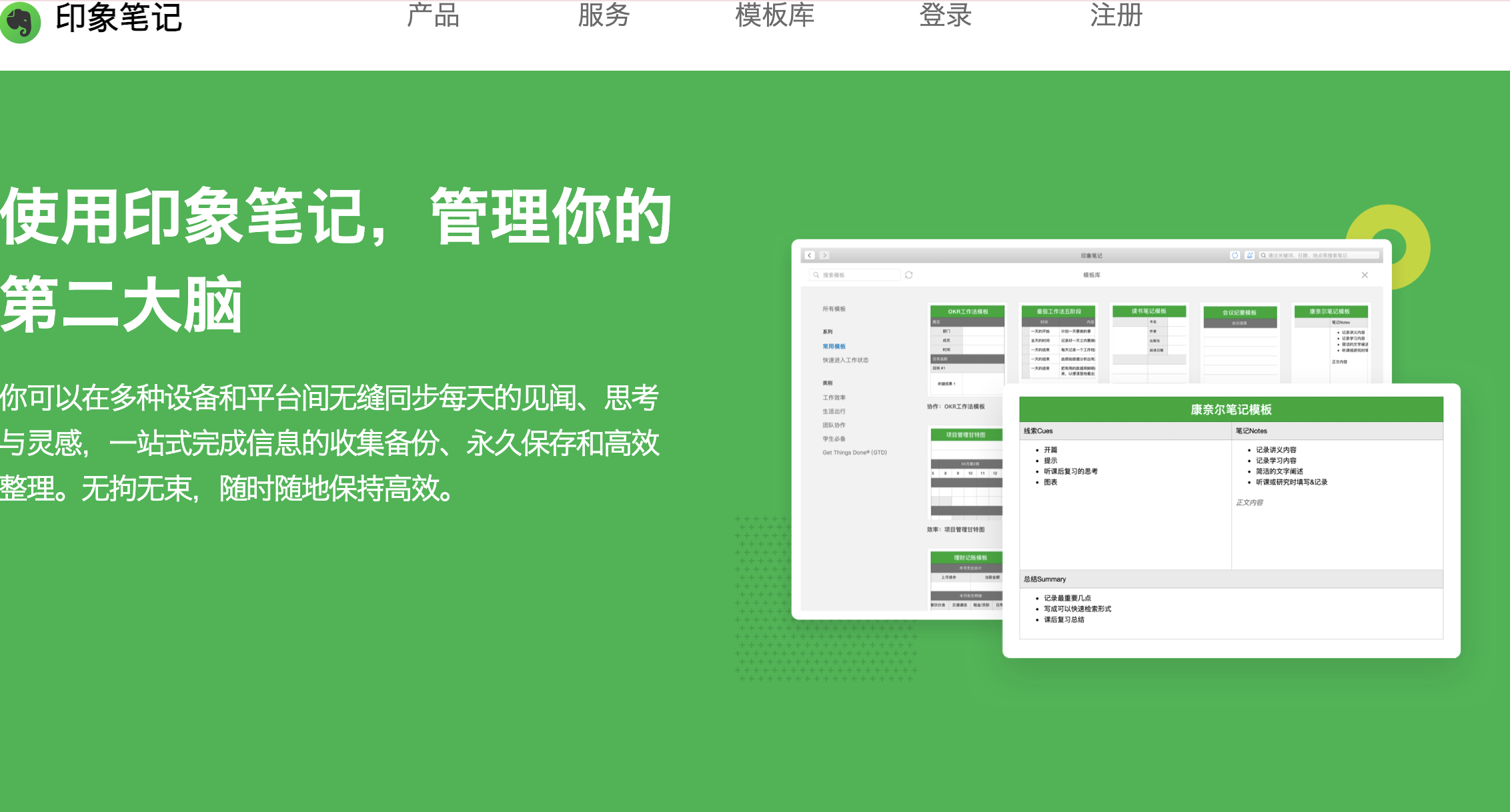
Consider how Evernote approached its China launch. The company created a localized brand name, Yinxiang Biji, adapted the product for local connectivity challenges, and hosted data within China. Within a year, they had four million Chinese users.
Good automated translation workflows are the starting point, but localization is what makes the experience stick.
How to prepare your app for localization
The best time to prepare for localization is during development. Internationalization (i18n) sets the foundation for everything that follows.
Internationalization first
i18n means engineering your app so it can support multiple languages without requiring code changes each time you add one.
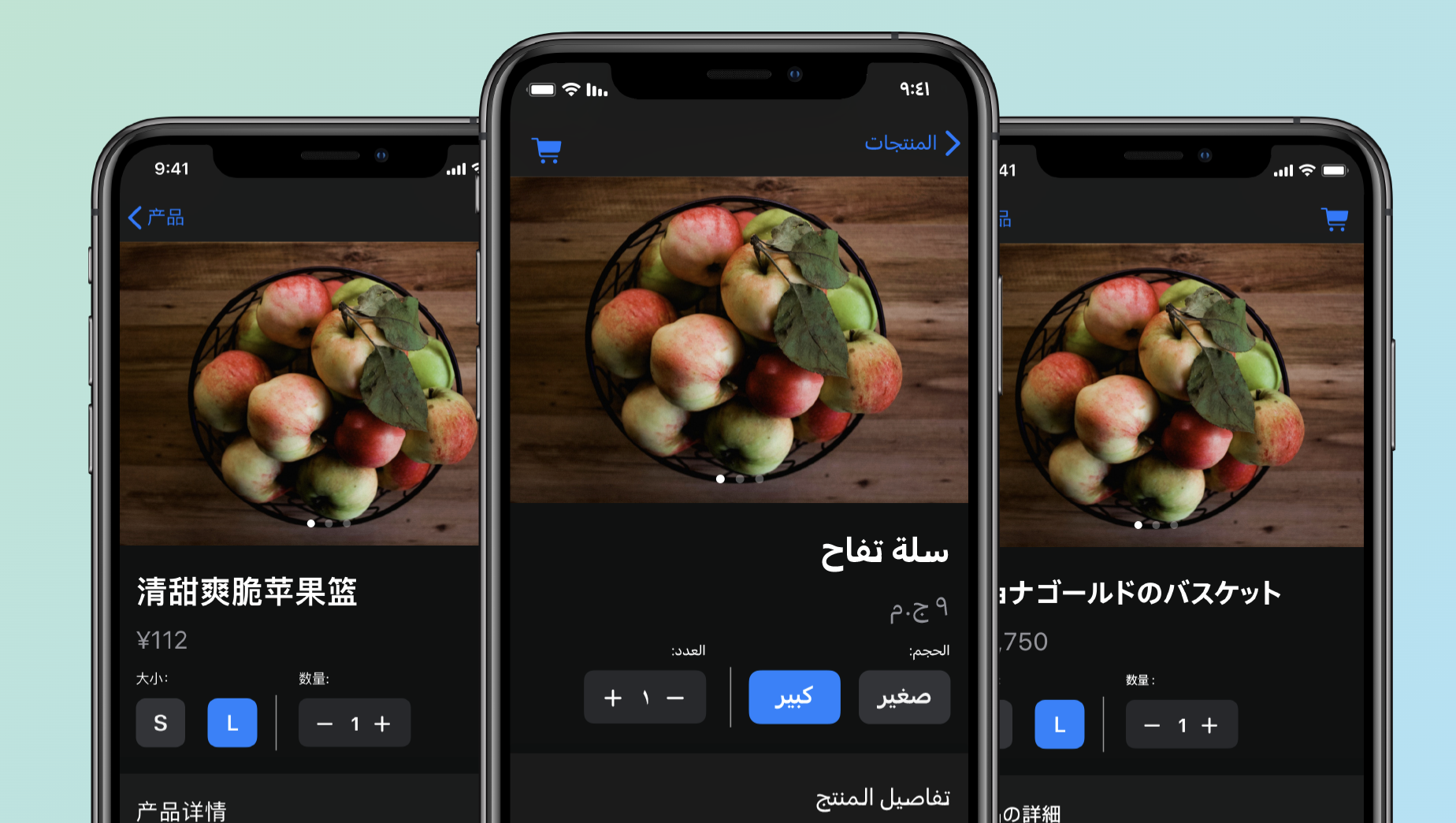
Here's what that involves:
- Externalize all strings into resource files (JSON, XLIFF, .strings for iOS, strings.xml for Android). Never hardcode text in your codebase.
- Avoid hardcoding formats. Dates, times, currencies, and numbers should pull from locale-aware libraries, not static values.
- Design flexible layouts. German text can expand 30% longer than English. Arabic and Hebrew read right-to-left. Your UI needs to handle both without breaking.
- Use UTF-8 encoding. It supports every language and character set globally.
- Plan for pluralization. Different languages have different plural rules. Structure your strings to handle them.
Merge strings across iOS and Android
If you're shipping on both platforms, avoid translating the same strings twice. Create a shared set of keys for identical content and only split platform-specific strings into separate files.
This reduces translation costs, keeps terminology consistent, and makes your software localization tools work more efficiently.
Key distinction: Internationalization customizes code. Localization customizes content. You need both, but i18n has to come first.
What are the key steps to localize a mobile app?
A successful mobile app localization project follows a clear sequence, from market research through testing and launch. Skip a step and you'll pay for it later.
Research your target markets
Start by identifying which languages and regions offer the highest ROI. Look at your existing analytics for signals: where are users already downloading your app? Which regions show organic interest?
Analyze competitor apps in each market. Read their reviews. Look at what users complain about and what they praise. That tells you where the bar is.
Build your localization kit
Before you hand anything to translators, assemble the assets they'll need:
- Glossary with approved translations for key terms, brand names, and product features
- Style guide per language, covering tone, formality level, and formatting rules
- Translation memory to reuse past translations and maintain consistency
- Visual context so translators can see where each string appears in the UI
Translate and adapt content
This is where the actual localization happens. You're translating UI strings, in-app copy, error messages, onboarding flows, push notifications, and any media assets. Images with embedded text need localized versions too.
Don't forget legal and compliance content. Privacy policies, terms of service, and data consent notices may need to meet local regulatory requirements.
Test across devices and locales
Functional testing catches bugs. Linguistic QA catches mistranslations. Layout testing catches text overflow and broken UI elements. You need all three.
Test on actual devices, not just emulators. Pay special attention to screens where space is tight, like buttons, navigation bars, and notification banners.
Here's how the full process maps out:
| Step | What it involves | Who owns it |
|---|---|---|
| Market research | Language selection, competitor analysis | Product and marketing |
| i18n prep | Externalize strings, flexible layouts | Engineering |
| Localization kit | Glossary, style guide, translation memory | Localization team |
| Translation | UI, in-app content, media | Translators and vendors |
| QA and testing | Linguistic, functional, layout | QA and localization |
| Launch and iterate | ASO, monitor reviews, update | Product and marketing |
The right software localization process makes every release repeatable. The wrong one turns it into a fire drill. Choose localization tools that automate handoffs and keep everyone aligned.
How do you localize app store listings?
App store optimization (ASO) for localized markets is one of the highest-ROI activities in mobile app localization. Most teams skip it entirely, and that's a mistake.
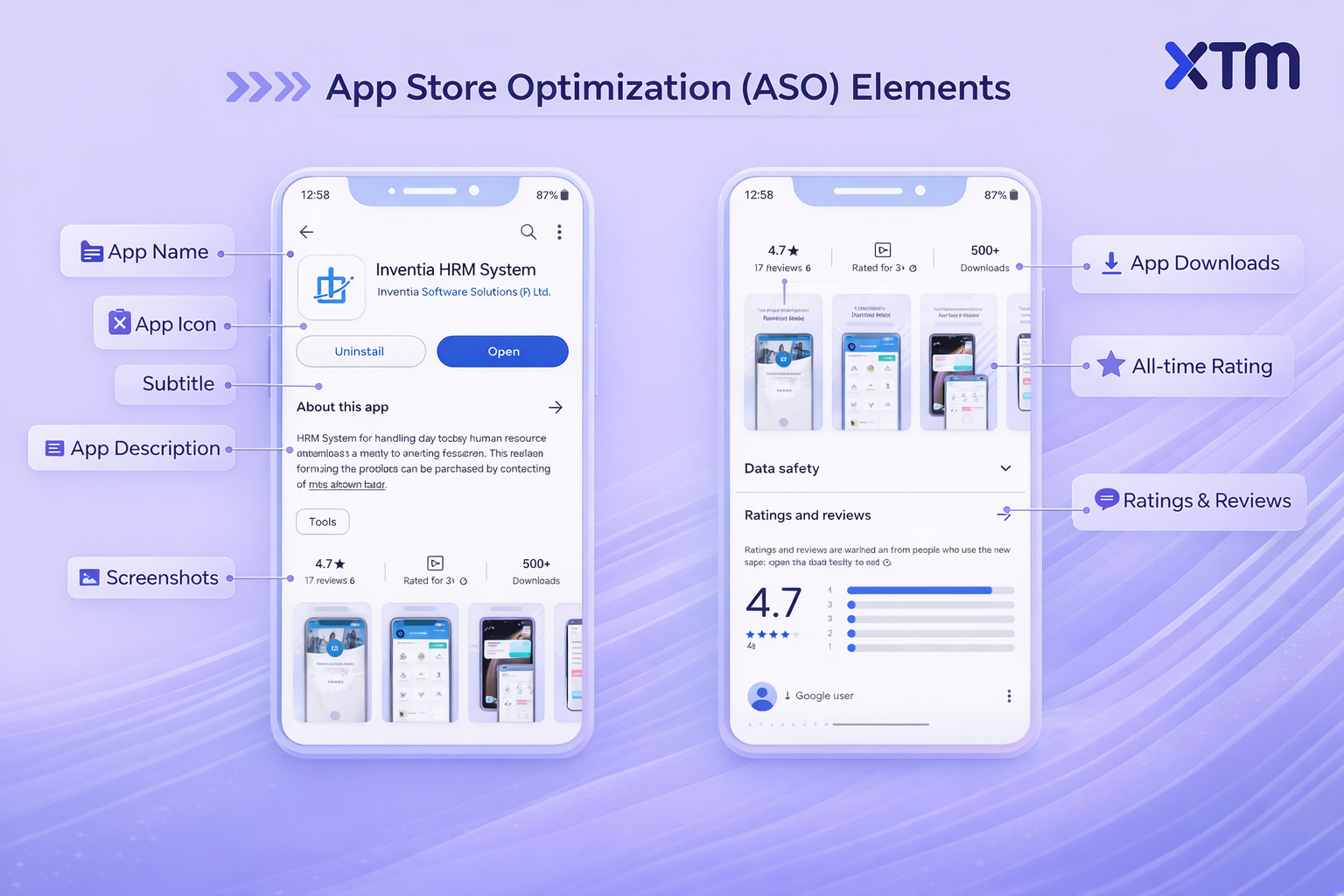
Your app store listing is the first thing users see. If it's not in their language, they'll scroll right past it.
Here's what you need to localize:
- App name and subtitle. Adapt for local search terms, not just direct translation.
- Description. Rewrite it for each market. What resonates in Germany won't necessarily work in Japan.
- Keywords. Research local search terms. Direct translations of English keywords rarely match what local users actually type.
- Screenshots and preview videos. Localize the text overlays. Show the app in the local language.
- What's new section. Keep release notes localized for every update.
Apple App Store and Google Play have different metadata requirements:
| Metadata field | Apple App Store | Google Play |
|---|---|---|
| App name limit | 30 characters | 30 characters |
| Subtitle | 30 characters | N/A |
| Short description | N/A | 80 characters |
| Full description | 4,000 characters | 4,000 characters |
| Keywords field | 100 characters | N/A (uses description) |
| Screenshots | Up to 10 per locale | Up to 8 per locale |
Monitor reviews in each market after launch. User feedback in localized markets often reveals issues your testing missed. A solid enterprise localization process includes regular review monitoring as part of the ongoing workflow.
What role does visual context play in app localization?
Translators produce better results when they can see exactly where their text appears in the app's UI. This reduces errors and back-and-forth significantly.
The traditional approach is painful. Translators receive a spreadsheet full of string keys and source text. They translate "Submit" without knowing if it's a button, a form heading, or a menu item. They translate "Save" without knowing the button is only 60 pixels wide.
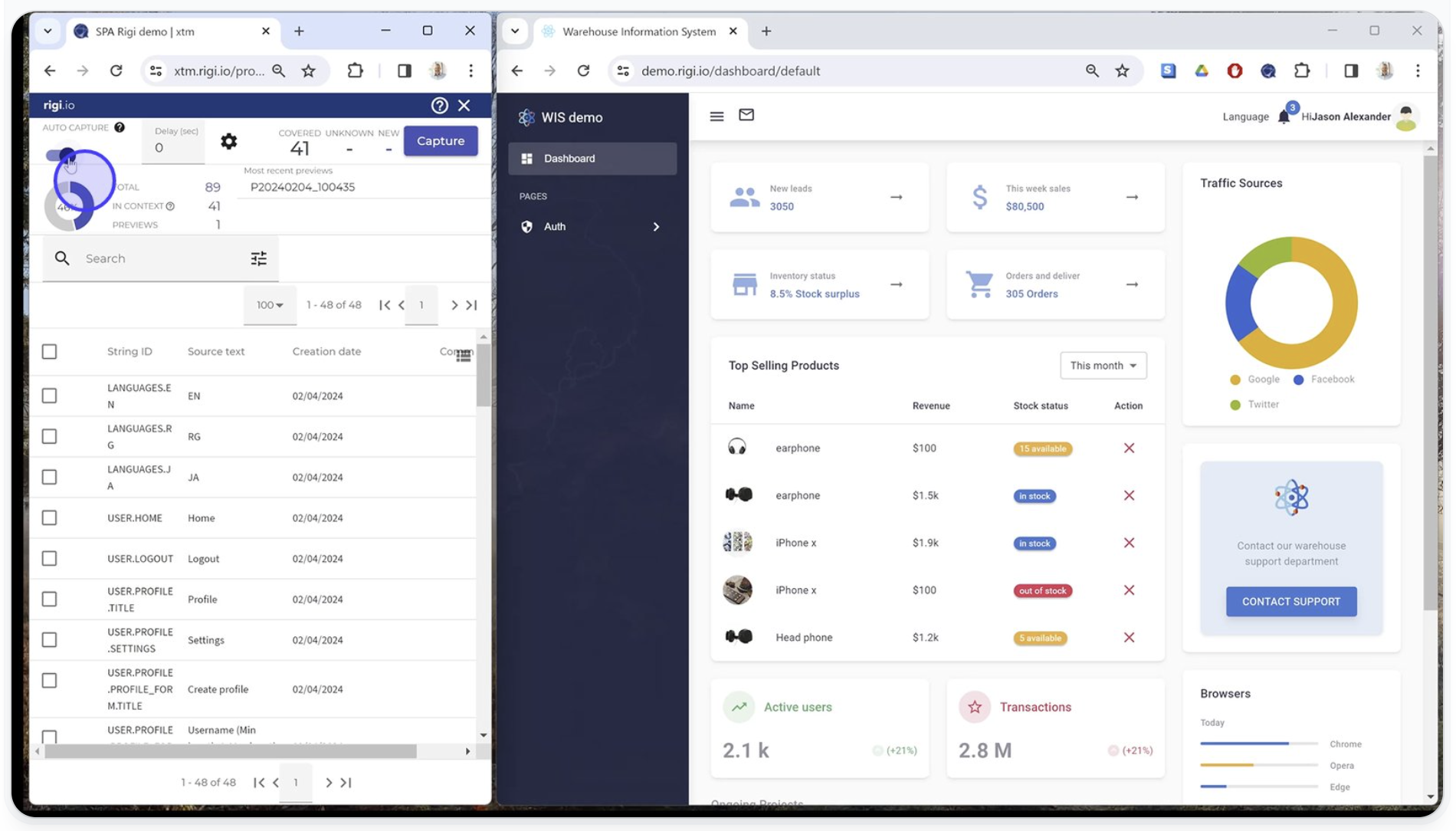
The result? Translations that don't fit. Text that overflows. Meaning that gets lost because the context was never there.
Visual context tools (like Rigi) solve this by showing translators the actual app interface alongside the strings they're translating. They can see the screen, the layout, and the exact space available for their text.
Key insight: When translators see a 12-character button label needs to fit a 90px-wide touch target, they make better choices the first time. That's what visual context does.
Rigi provides dynamic visual previews for mobile, web, and embedded software.
Translators and reviewers see exactly how their translations will appear in the live UI without needing code access or developer support. Companies using this approach report up to 70% fewer translator queries and significantly fewer revision cycles.
Pair visual context with the right app localization solution and you'll see faster turnaround, fewer bugs, and higher-quality translations across every language.
How does continuous localization work for mobile apps?
Continuous localization keeps translations in sync with your development cycle so you can ship multilingual updates without delays. It's the only approach that works at scale.
The old way was waterfall: develop the feature, freeze the strings, send them for translation, wait, integrate, test, then release. By the time translations came back, the next sprint had already changed half the strings.
Continuous localization flips this. Translation runs in parallel with development. When a developer commits new or changed strings, the localization platform detects them and routes them to translators automatically.
Here's what that looks like in practice:
- Code commit triggers string detection. New or updated strings get flagged automatically.
- Strings route to translators based on language, content type, and priority.
- Translators work in context while development continues on the next feature.
- Translations sync back into the codebase, ready for the next build.
XTM Cloud's automated workflows handle the routing, and Rigi CLI integrates directly into your CI/CD pipeline.
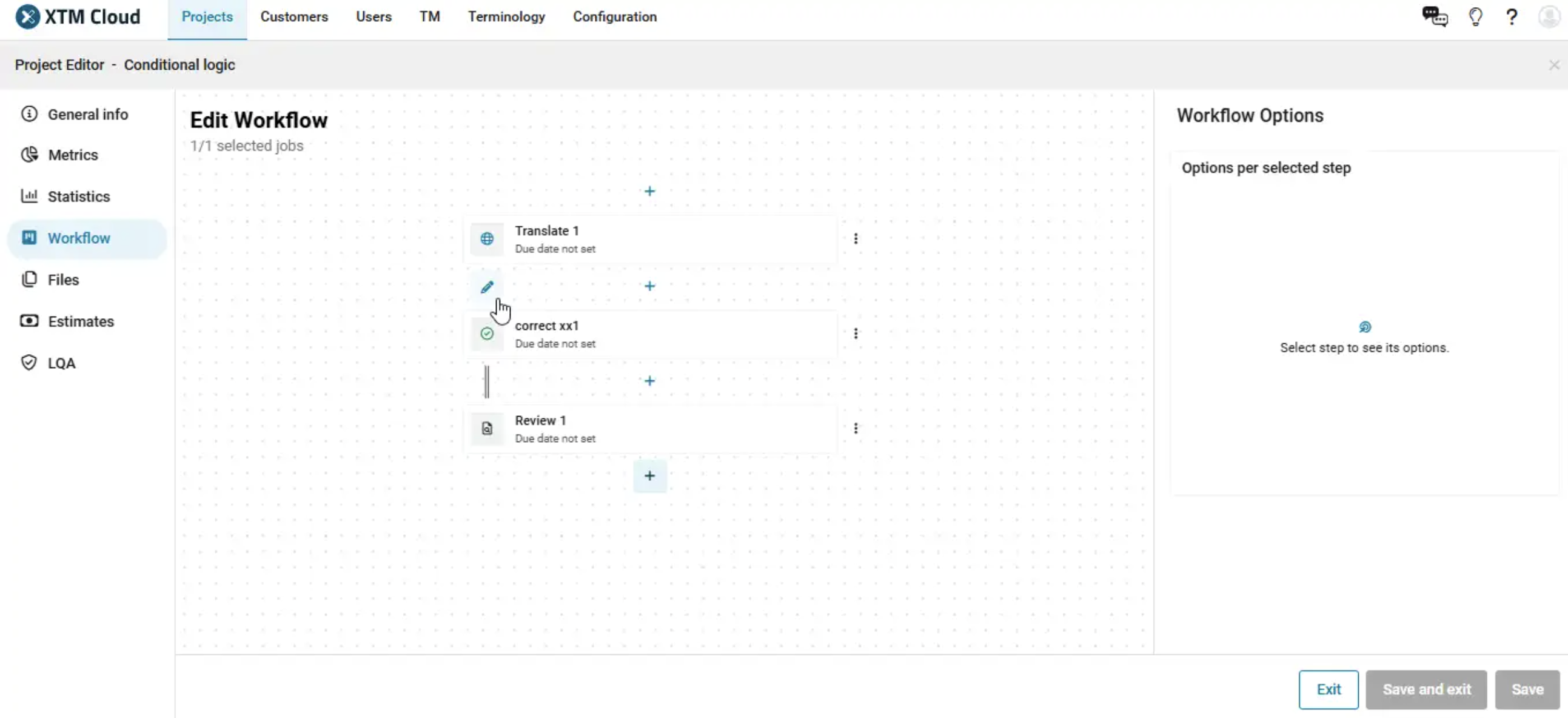
It triggers localization processes through command-line execution, syncs resource file changes during CI/CD runs, and delivers localization-ready files, all without manual intervention. Learn more about these software localization capabilities.
Key distinction: Waterfall localization delays your release. Continuous localization keeps translation running in parallel with development so both ship at the same time.
How can AI speed up mobile app localization?
AI reduces translation costs, speeds up delivery, and improves consistency. But it works best when paired with human review and strong translation memory.
Here's where AI adds the most value in mobile app localization:
- First-draft translations. AI-powered machine translation handles high-volume, repetitive strings quickly. Think confirmation dialogs, standard error messages, and settings labels.
- Quality scoring. AI flags inconsistencies in terminology, formatting errors, and segments that need human review.
- Translation memory enhancement. AI finds relevant matches even when segments aren't identical. XTM's SmartContext generates context-aware translations based on fuzzy matches, maintaining brand voice with less post-editing.
- Automated QA. Catches missing placeholders, number formatting issues, and length violations before translators even see them.
Not everything should run through AI unsupervised. Here's where to draw the line:
| Task | AI handles well | Human review needed |
|---|---|---|
| UI string translation | Repetitive, standard strings | Brand voice, creative copy |
| Quality checks | Terminology, formatting | Cultural nuance, humor |
| TM enhancement | Fuzzy match improvement | Context verification |
| Error messages | Templated, predictable | Legal and compliance text |
AI translation tools are quickly getting better. The key is knowing when to let AI run and when to bring in a human.
Did you know? XTM has a suite of AI capabilities, including Intelligent Score, Intelligent Workflow, and XTM Agent.
Together, they take the guesswork out of localization, automatically scoring quality, routing work based on priority, and resolving issues before they ever reach your team.
The result: faster time to market, less manual QA, and complete control over how AI is used across your workflows.
Want to see how it all fits together? Learn more about XTM's AI capabilities.
Common mobile app localization mistakes (and how to avoid them)
Most localization failures come from poor planning, not poor translation. Here are the mistakes that cost teams the most time and money.
- Hardcoding strings. If translatable text lives inside your code instead of external resource files, every language change requires a code change. Fix this during i18n.
- Ignoring text expansion. German text runs about 30% longer than English. If your UI doesn't flex, translations will break layouts or get cut off.
- Skipping app store localization. Your app might be perfectly localized inside, but if your store listing is still in English, users in other markets won't find it.
- Translating without context. Sending a spreadsheet of string keys to translators guarantees confusion. Use visual context tools so they can see the UI.
- Treating localization as a one-time project. Every update introduces new strings. Without continuous localization, your translations fall behind with every release.
- Not investing in a TMS. A translation management system centralizes translation memory, automates workflows, and keeps quality consistent across languages and releases.
Final thoughts
Mobile app localization isn't optional for teams with global ambitions. It's how you turn a single-market product into something millions of people can actually use.
The process is straightforward when you plan it right. Start with solid i18n foundations. Give translators visual context. Automate what you can with continuous localization. And use AI where it adds speed without sacrificing quality.
When your localization platform connects your development pipeline, translation workflows, and quality controls in one place, you ship faster and with fewer surprises. That's the difference between localization as a bottleneck and localization as a growth engine.
Mobile app localization FAQs
What is localization in apps?
App localization is the process of adapting your mobile app for users in different markets. It covers translating UI text, adjusting date and currency formats, adapting images and layouts, and localizing app store listings. The goal is to make the app feel native to users in every region, not just translated.
How do you localize a mobile app?
Start with market research to identify your target languages and regions. Then build a localization kit with a glossary, style guide, and translation memory. Translate and adapt all content, including UI strings, in-app copy, images, and app store metadata. Run linguistic and functional QA testing across devices before launch, and set up continuous localization to keep translations in sync with future updates.
How do you prepare your app for localization?
Preparation starts with internationalization (i18n) during development. Externalize all strings into resource files like JSON or XLIFF. Avoid hardcoding dates, currencies, and number formats. Design flexible layouts that handle text expansion and right-to-left scripts. Use UTF-8 encoding and plan for different pluralization rules. If you're building for both iOS and Android, merge shared string keys to avoid duplicate translation work.
How to add localization to iOS app?
For iOS, store all user-facing strings in .strings or .stringsdict files and use NSLocalizedString to reference them in code. Add target languages in Xcode under your project's localization settings, which generates locale-specific resource folders. Use Auto Layout to handle text expansion, and test with pseudolocalization to catch layout issues early. For app store localization, add translated metadata and screenshots through App Store Connect for each supported locale.
Ready to see how mobile localization works without slowing down releases? Take the Rigi product tour to see dynamic mobile UI context and structured review in action.

Subscribe for More
Lorem ipsum dolor sit amet, consectetur adipiscing elit, sed do eiusmod tempor incididunt ut labore et dolore magna aliqua. Ut enim ad minim veniam, quis nostru.