




.png?width=512&height=512&name=FlowFit_Flavicon%20(1).png)







Choosing the right software localization tool can feel like a minefield.
The right tool will slot smoothly into your dev workflow and automate repetitive tasks that waste precious time. Get it wrong? Prepare for endless delays and a frustrating user experience.
In this guide, you’ll learn which platforms deliver value for your specific needs. Plus, discover the five factors you should consider before making your final call.
Table of contents
- Quick software localization tool comparison table
- Enterprise-level software localization tools
- Developer-friendly and API-first tools
- Open-source and budget-conscious options
- How to choose the right software localization tool
- A better way to manage software localization at scale
Quick software localization tool comparison table
Short on time? Here’s a quick overview of the software localization tools featured in this article to help you identify the best option for your business.
| Tool name | Best for | Pricing model | Free plan available? | Notable integrations | Suitable company size |
| XTM Cloud | Customized enterprise workflows | Custom pricing for enterprise | No free plan | GitHub, Git, Figma, Rigi, Microsoft VSTS/TFS | Enterprise-level |
| Phrase | String-key based CI/CD integration | Custom pricing for enterprise | 14-day free trial | GitHub, GitLab, Bitbucket, Adobe Experience Manager | Enterprise-level |
| Smartling | Automatic content capture via proxy | Available on request | No free plan | GitHub, Figma, Zendesk, CMS systems, e-commerce platforms, project management systems | Enterprise-level |
| Rigi | Visual context for UI-heavy products | Available on request | No free plan | XTM Cloud, memoQ, Trados, application programming interface (API) for file management, various machine translation engines | Mid-to-large-sized teams |
| Lokalise | Design-to-distribution mobile apps | Starting from $120/month | 14-day free trial | GitHub, GitLab, Adobe XD, Figma, Slack, Jira | Mid-to-large-sized teams |
| Crowdin | Direct code repository integration | Starting from $50/month | Free plan (60,000 words) | GitHub, GitLab, Bitbucket, Figma, SDK for mobile apps, CI/CD systems, version control | Small to enterprise-sized teams |
| Transifex | Instant push updates | Starting from $120/month | No free plan | GitHub, GitLab, Bitbucket, Azure Repos, Figma, Slack | Small to enterprise-sized teams |
| Poedit | Local file-based translation | Free version, Pro: $29.99 one-time | Yes (free version) | Crowdin, Localazy, machine translation software (DeepL, Google), FTP for remote installs | Small teams/individual developers |
| Weblate | Self-hosted Git-based control | Free (self-hosted) or €37 ($42)/month (cloud) | Yes (self-hosted) | GitHub, GitLab, Bitbucket, machine translation engines (Google, DeepL), REST API | Small to mid-sized teams |
Keep reading for a breakdown of each tool grouped by relevant category. Whether you want an enterprise-level, developer-first, or low-cost solution, you’ll find the right tool.
Enterprise-level software localization tools
Finding the right enterprise solution can make the difference between a smooth global launch and a logistical nightmare. These platforms help large organizations streamline localization while maintaining high quality.
XTM Cloud: Enterprise-grade cloud-based control with AI
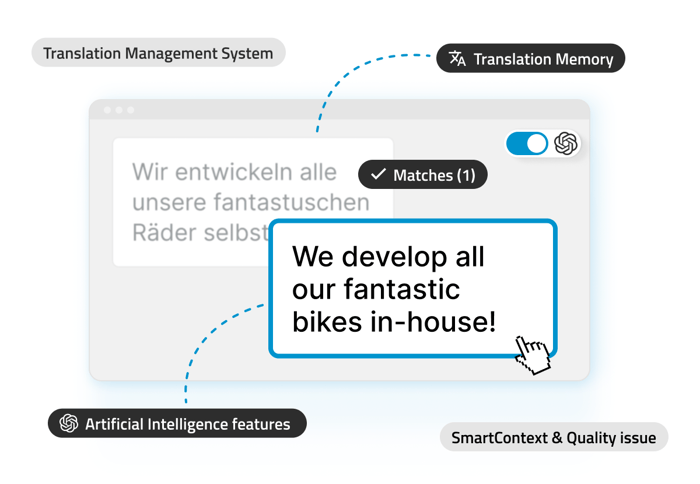
XTM Cloud is a powerful translation management system (TMS) that transforms complex localization processes into automated workflows.
Through its extensive integration library, it connects straight to your Git repositories and content systems. No more manual file handling. Your translations stay automatically in sync with your source content changes.
Take Bigpoint. By linking XTM Cloud and GitHub, the video game developer could automatically detect new or updated source texts and instantly trigger translation tasks. The integration slashed manual processes, eliminated errors, and brought its A-game on speed and quality.

See how XTM Cloud streamlines software localization from code to deployment
Discover how XTM Cloud integrates with your repositories and tools to simplify dev handoffs, reduce translation errors, and keep releases on track.
What distinguishes XTM Cloud from other enterprise platforms is its vendor-neutral approach. Unlike systems that lock you into specific translation providers, XTM Cloud allows you to work with your preferred language service providers (LSPs) while keeping control of your translation assets and memory.
The platform’s AI capabilities accelerate human translation rather than replace it. XTM AI SmartContext fine-tunes large language model (LLM) based translation outputs with fuzzy matches from translation memory for improved consistency.
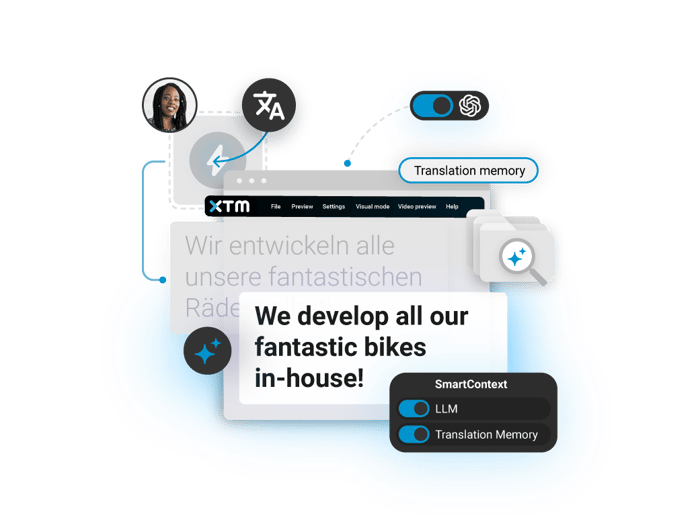
Linguists and reviewers can see exactly how strings appear with integrated real-time visual context from Rigi (more on this tool later). Using this platform in conjunction with XTM Cloud reduces errors and guesswork and speeds up your QA.
Use cases include companies like Ariel, where AI-powered workflows in XTM Cloud reduce human translation by 31% and double machine translation output. All while improving quality and cutting costs.
| Best for | Enterprises needing fully customizable, automated localization workflows with deep toolchain integration |
| Key features |
Customizable multi-step workflows with automation rules Advanced linguistic AI for improved match retrieval Visual mode for in-context translation and review Robust API for custom integration development Centralized asset management with version control Comprehensive analytics and reporting Multi-tenant license model for cost optimization |
| Pricing | From $16,500 a year |
| Integrations |
60+ integrations including: Development. GitHub, GitLab, Azure Repo, BitBucket Design. Figma, Adobe InDesign CMS. Adobe Experience Manager, Drupal, WordPress, Sitecore Marketing. HubSpot, Adobe Marketo Engage Support. Zendesk, ServiceNow, Jira, Slack eCommerce. Salesforce Commerce Cloud Translation software. Rigi (visual localization), XTRF (vendor management) Partners. Compatible with all major LSPs and freelance platforms |
| What users say |
|
XTM Cloud is specifically built to help you manage complex software localization at scale. Research shows that AI tools like those baked into XTM Cloud reduce time to market by almost 30%.
Phrase: Enterprise localization with string-key workflows
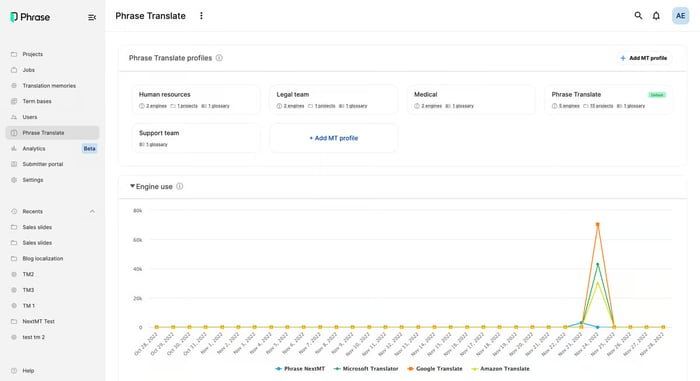
Source: G2
Localization shouldn’t be an afterthought. With Phrase, it becomes part of your development pipeline.
Rather than juggling raw text, the tool stores translated content with unique identifiers (like “welcome_message” or “checkout_button”). So it’s easy to ensure accurate translations across languages.
Phrase hooks directly into repositories like GitHub and GitLab, meaning you can handle translations alongside code changes.
That parallel workflow? You get to launch in multiple new markets at once.
Phrase is built for speed. If your team needs strict vendor management or approval workflows, the setup may feel lightweight.
| Best for | Teams that need string-key based localization, version control for translations, and the ability to deploy translations with their codebase |
| Key features | Support for 50+ file formats with seamless conversion between formats
Full-featured API for custom integrations and webhooks Branching capabilities for version management Dedicated command line interface (CLI) tool for developers Advanced security and compliance (ISO 27001, GDPR, PCI DSS) |
| Pricing | Custom pricing for enterprise
14-day free trial |
| Integrations | GitHub, GitLab, Bitbucket
Adobe Experience Manager HubSpot Marketo WordPress Numerous other CMS and development platforms Custom integrations through API and webhooks |
| What users say | According to one G2 reviewer:
|
This simple software is a strong fit for engineer-led teams where localization must move as fast as code. If your org runs on layered audit trails and regulatory oversight, double-check that it can help you tick those boxes.
Smartling: Automated content detection for web and mobile apps
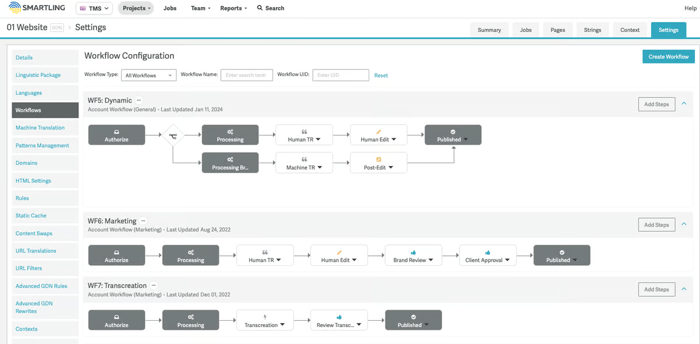
Source: G2
Smartling’s Global Delivery Network (GDN) automatically captures text updates and sends them for translation right away. The result? It cuts out the “string hunting” process that slows down app localization.
The platform uses a mix of AI translation for high-volume content and professional translators for customer-facing elements. It’s designed around managed workflows, where tasks move through set stages from translation to publishing.
This setup keeps things moving quickly. If you want more freedom to customize workflows or manage translation steps yourself, you might find Smartling limiting.
| Best for | Digital-first companies needing automatic string detection across web, mobile, and support channels |
| Key features | Global Delivery Network (GDN) proxy that automatically detects and translates changes
Visual context for professional translators to see how text appears in the app Combination of AI translation and human translation services Customizable workflows and project management TM with quality checks Linguistic Quality Assurance (LQA) Suite for enterprise users |
| Pricing | Available on request |
| Integrations | GitHub and other code repositories
Figma and design tools Zendesk and support platforms CMS Marketing automation tools eCommerce platforms Cloud storage services Project management systems |
| What users say |
(Source: Smartling) |
Smartling’s automatic content detection is designed to save time. Just be aware you’re trading some workflow flexibility for convenience.
Developer-friendly and API-first tools
Developer-friendly and API-first tools put the power directly in your technical team’s hands.
These solutions integrate smoothly with your existing development process, letting engineers manage translations through code rather than jumping between different platforms. They’re ideal for teams that prefer automation over manual file handling.
Rigi: Visual previews without source code access
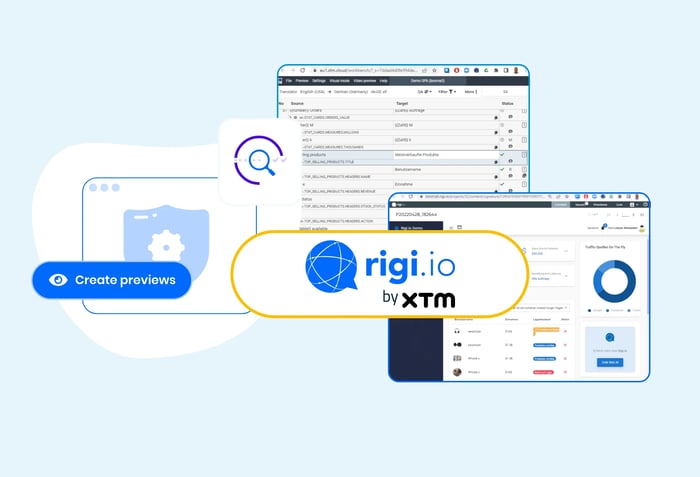
Rigi by XTM is a robust software localization platform showing dynamic visual previews of translated software UI.
It shows translators and reviewers exactly where and how text will appear in your interface (including space constraints and surrounding elements) instead of sending them isolated strings.
Eliminate guesswork with visual localization
See how Rigi helps translators work faster and more accurately by showing exactly how strings appear in the user interface. In real time.
Rigi’s visual approach streamlines the development cycle. When translators instantly see a string’s purpose, they can make smarter decisions about length, terminology, and tone.
All without bombarding your team with questions about context.
Rigi fits right into your existing development workflow thanks to its API for automated file handling. Plus connections to UI testing frameworks that capture real-time HTML previews as your interface changes.
| Best for | UI-focused teams that need to provide visual context to translators without sharing source code |
| Key features | Displays visual context for all translatable strings
Extracts content without requiring source code access Provides real-time, in-context translation and review in a web browser Offers project management dashboard with KPI visualization Creates multilingual screenshots with one click using patented technology Supports ID-based localization approach as an alternative to traditional TM |
| Pricing | Custom pricing available on request. Book a demo here. |
| Integrations | XTM Cloud and all XTM products
memoQ, Trados (XLIFF export with visual context via Rigi plugins) Passolo (file export/import) API for source and target files Automated UI tests for dynamic previews Multiple machine translation engines: DeepL, Globalese, etc. |
| What users say |
|
With Rigi’s visual approach, you’ll finally bridge the gap between development and translation. Meaning faster releases and even better products for global markets.
Lokalise: When design and development need to speak the same language
Source: Lokalise
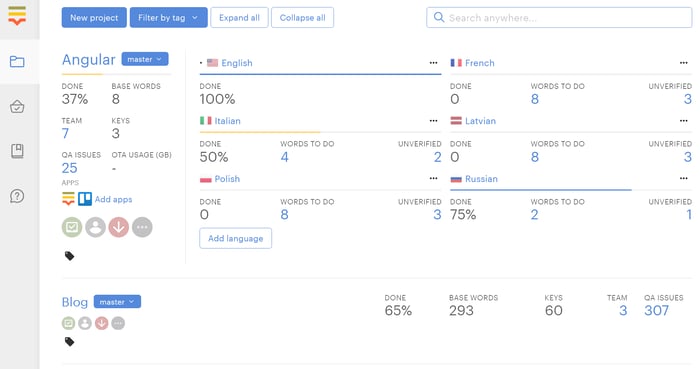
Lokalise keeps translations in sync with your development cycle so localization doesn’t lag behind your code updates.
The API and CLI tools reduce manual work by automating file handling. Design software plugins let designers flag text for translation from the mockup phase.
Mobile app developers can update translations without submitting new builds to app stores using the over-the-air SDK. This means you can fix translation errors without waiting for app review processes.
Lokalise primarily focuses on web and mobile apps. If you need to localize gaming UI or desktop software, another tool may be a better fit.
| Best for | Tech-focused teams that want to integrate localization directly into their development workflow and automate routine translation tasks |
| Key features | API and CLI tools for developer automation
Over-the-air updates for mobile apps Automatic duplicate finding and linking Screenshot context with automatic text recognition |
| Pricing | Limited free plan with two seats
Starting from $120/month for small teams Custom pricing for enterprise 14-day free trial |
| Integrations | GitHub, GitLab, Bitbucket, Azure Repos
Adobe XD, Figma, Sketch Slack, Trello, Jira, Asana WordPress, HubSpot, Zendesk, Intercom Contentful, Storyblok, Contentstack Amazon S3, Google Cloud Storage Various SDKs for different programming languages |
| What users say |
According to one reviewer: “Lokalise is a developer-friendly translation tool. Their API is modern and helped us create a creative solution for translations, and they have a branching feature that allows making translations in isolation per feature.” |
Lokalise provides a collaborative platform for teams that span product, development, and localization departments. How well the tool fits depends on your needs.
Crowdin: Continuous localization at development speed
Source: Crowdin
Crowdin bakes localization into your development pipeline. So you can launch in different languages the moment your product goes live.
Developers can automate the entire process using the CLI, API, or webhooks, syncing directly with your code repositories. So your team doesn’t have to handle localization files manually.
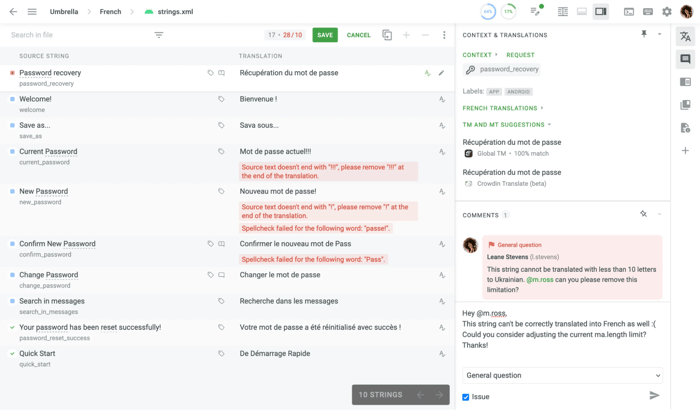
In Crowdin, translators see screenshots and visual context that show how and where each string appears.
The trade-off? A steep learning curve — especially for smaller teams.
You might spend more time getting your bearings than completing translations at the start. And because it’s string-based, you’ll want to ensure careful planning to maintain consistency across your projects.
| Best for | Development teams that want to integrate localization directly into their development cycle and release workflow |
| Key features | Branch management for version control
QA checks for translation quality User role management for localization team collaboration String history and change tracking Custom glossaries and style guides TM to leverage past work Task assignment and progress tracking tools Review and approval workflows for translation projects |
| Pricing | Free plan with 60,000 hosted words and unlimited translators
Starting from $50/month for professional features Custom enterprise pricing for larger teams |
| Integrations | GitHub, GitLab, Bitbucket (including Enterprise versions)
Continuous integration (CI)/continuous delivery (CD) systems Design tools like Figma Android/iOS software development kit (SDK) for mobile apps Various version control systems (Git, SVN, Mercurial) |
| What users say |
According to one reviewer: Crowdin allows us to easily connect internationalization managers, third-party translators and developers. As a developer, I liked the APIs for a complete pipeline for building and exporting localizations to mobile projects.” |
In sum, Crowdin delivers continuous localization for development-focused teams. Just be ready to spend a little time finding your feet first.
Transifex: Real-time translation infrastructure
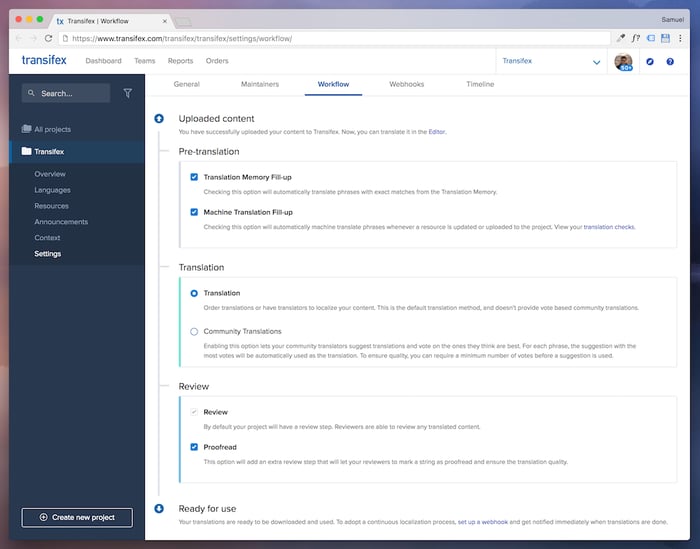
Transifex — recently acquired by XTM — helps you translate your software while your team keeps building. The platform connects to your code repositories so translators can work on the latest content without holding up your release schedule.
Need to fix a mistranslation? Push it live instantly with over-the-air updates instead of waiting for your next deployment.
The platform combines AI-powered translation to handle high volumes with visual context tools that show translators exactly where text appears in your interface. This blend of automation and context awareness helps maintain quality while keeping costs in check.
| Best for | Companies that need to push translation updates instantly without waiting for code deployments |
| Key features | AI-powered translation capabilities
Over-the-air updates through SDKs Real-time publishing of translations Visual context through screenshots TM and glossary tools Automated quality assurance Workflow management and reporting Cross-project string search Compatible with 500+ languages |
| Pricing | Starting from $120/month for professional features
Custom enterprise pricing available for teams translating over 1M words |
| Integrations | GitHub, GitLab, Bitbucket, Azure Repos
Figma, Sketch Contentful, Zendesk, WordPress, Drupal Slack, Jira, Zapier Custom API, SDKs, CLI, and webhooks |
| What users say |
According to one reviewer: “Before we started using Transifex, teams were manually emailed spreadsheets of words and phrases to our translators, and then copied the results into YAML files. This process was slow, error-prone, not scalable, and not a valuable use of developer time. Transifex eliminated all that.” |
For developers, Transifex offers API, SDK, and CLI options that fit neatly into the existing CI pipeline. Making translations just another part of your regular workflow.
Open-source and budget-conscious options
Not every project requires an enterprise-grade localization platform with all the bells and whistles.
If you’re working with limited resources or need a simple solution for smaller projects, these open-source and budget-friendly options deliver solid functionality without the enterprise price tag.
Poedit: Local translation editor with syntax validation
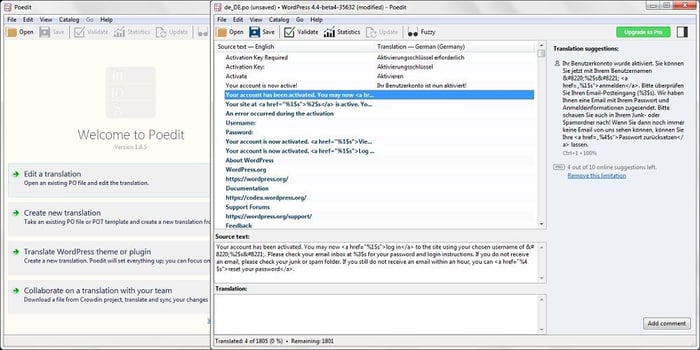
Source: L10n Software
Poedit is a no-frills translation editor for developers and translators working with heavily code-based formats. Like GetText, XLIFF, JSON, and Flutter.
It catches common issues like incorrect plural forms, missing tokens, and syntax errors. Use its built-in quality check to avoid translation bugs that often sneak into software releases.
There’s a one-time payment option that independent developers and small teams will find cost-effective.
While Poedit works well for local translation tasks, it lacks team coordination features and integrations with development pipelines. Making it less practical for larger collabs.
| Best for | Individual developers and small teams working with GetText, XLIFF, JSON, or Flutter formats who need a desktop-based translation solution |
| Key features | Comprehensive safety and syntax checks
TM for consistent terminology Machine translation integration (Pro versions) Source code string extraction capabilities Template support for multiple frameworks (Pro) Detailed translation statistics |
| Pricing | Free version available with essential functionality
Pro: $29.99 one-time payment Pro+: $3.33/month with enhanced AI translation features Team: $6.99/device/month for organizational use |
| Integrations | Cloud localization platforms (Crowdin, Localazy)
Machine translation services (DeepL, Google, Microsoft) Various programming frameworks FTP for remote installations |
| What users say | According to one reviewer:
|
With Poedit, you get desktop-based translation with strong validation checks. Minus the team collaboration and automation features that cloud-based platforms offer.
Weblate: Git-native translation for self-hosted control
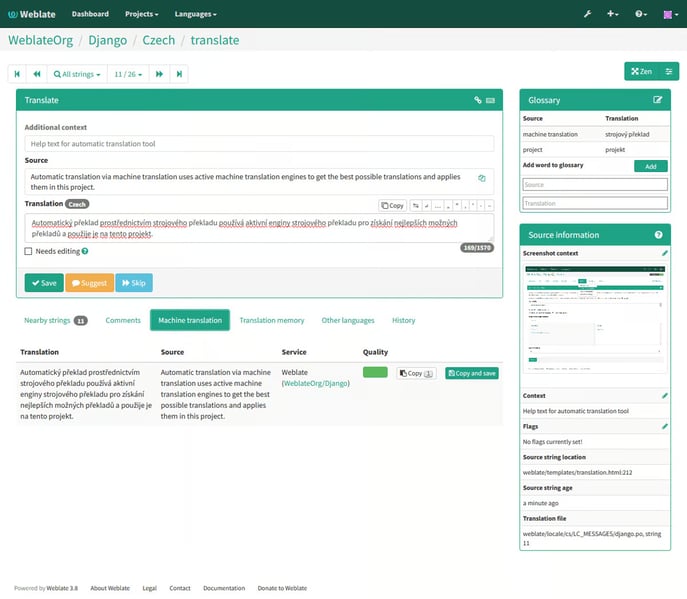
Source: G2
Weblate is a self-hosted localization platform designed for teams that want more control over their translation process. It integrates tightly with your version control system, allowing translators to work directly with your code in real time without disrupting the development flow.
Weblate gives you the option to host everything on your own infrastructure. It supports continuous translation, so you can push source string updates to your repository without manual steps.
Its web interface supports collaborative translation. The platform has built-in TM, glossaries, and automated quality checks to ensure consistency for global audiences.
| Best for | Development teams that prefer open-source tools and want complete control over their localization infrastructure |
| Key features | Self-hosted or cloud-hosted options
Git-based translation management TM and glossary support Automated consistency and formatting checks Real-time collaboration with role-based permissions Visual context and screenshot support Workflow customization and branching Integrated machine translation suggestions |
| Pricing | Free and open-source (self-hosted)
Cloud hosting plans starting from €37 ($42)/month for 10,000 strings Custom enterprise pricing available |
| Integrations | GitHub, GitLab, Bitbucket
REST API and webhooks Machine translation engines (Google, DeepL, etc.) Custom scripts and automation via add-ons |
| What users say |
According to one reviewer: “Weblate has a lot of advantages. For example, it is web-based and easy to use, has a good version control ability, perfect translation memory, perfect communication and customer support, and the best one is the integration with APIs.” |
Weblate’s developer-friendly localization platform supports projects seeking full control through self-hosting. The technical setup may better suit teams with in-house engineering resources.
How to choose the right software localization tool
Research shows that 65% of companies report a three times ROI or more when localizing content. That’s why choosing the right tool is crucial — it can directly impact your efficiency and bottom line.
Along with basic capabilities and pricing, consider these five critical factors. They’ll help you determine whether a tool fits your development environment and business goals.
1. Common localization workflow needs and team structures
Pick a tool that matches your team’s size and structure, or you’ll pay for it later. Enterprise platforms overwhelm small teams with unnecessary complexity, while basic tools crumble under the weight of large organizations.
When evaluating options, ask yourself:
- How many developers vs. translators do you have? Developer-heavy teams need strong CLI and API features, while translator-heavy teams need better interfaces and context tools.
- How often do you release? Weekly updates demand continuous localization that syncs with your repositories. Monthly releases can manage with manual processes.
- Where is everyone located? Teams spread across time zones need cloud solutions with granular permissions. Co-located teams can use simpler tools.
- Who’s managing localization? If it’s your developers, look for code-centric tools. If it’s marketing, prioritize user-friendly interfaces.
Don’t swim against the current. Choose a tool that fits your existing workflow.
If you live in GitHub, get a tool with GitHub integration. If your team runs on Jenkins pipelines, ensure your localization platform plays nice with your CI/CD setup.
2. Integration with your existing tech stack
Your tech stack forms an ecosystem where tools need to work together. When your localization platform sits disconnected from this ecosystem, you create a translation island that drains productivity.
Before committing to any platform, verify that it connects directly with:
-
Your code repositories (GitHub, GitLab, Bitbucket): Does it automatically detect new strings when developers commit code?
-
Your CMS (WordPress, Contentful, Adobe): Can it pull content directly without manual exports that go stale immediately?
-
Your design tools (Figma, Sketch): Can translators see visual context without developers creating screenshots?
-
Your deployment pipeline: Will translations automatically flow into builds, or will someone need to copy files manually?
Each missing integration turns into a repetitive manual task. Even something as routine as a 10-minute export-import step can quietly drain hours. One study showed that automating five simple tasks saves five hours a month.
Without that kind of automation, teams waste valuable time. Worse still? Manual handoffs can cause errors, leaving global users seeing outdated or missing translations.
3. Scalability and automation
The localization tool that efficiently handles your current app might become your biggest constraint next year. When your string count jumps from hundreds to thousands, or your language count triples, inadequate tools create painful technical debt.
When evaluating scalability, ask about:
-
Future costs: What happens when your app has 3x more text? Some per-word pricing models become expensive at scale.
-
Duplicate strings: Can the system automatically detect and flag duplicate strings? If not, you could be paying to translate the same sentence. That adds up quickly.
-
High volumes: Does it offer APIs for batch operations when your string count hits 10,000+? Manually processing these volumes is a huge time sink.
-
Multi-repo management: Can it handle automatic string extraction from multiple repositories and branches without manual work?
-
Language-specific QA: Does it provide automated QA for challenging language pairs (like German text expansion or right-to-left languages)?
Investing in scalable automation now prevents the hidden costs of manual workarounds and emergency fixes as your localization needs grow.
4. Collaboration, quality control, and review flows
Poor collaboration between developers and translators leads directly to poor-quality translations. When translators can’t ask questions about context, they make assumptions. When developers can’t easily review translations, errors slip through.
Evaluate your localization platform’s collaboration capabilities by checking for:
-
Team communication: Does it integrate with your messaging platforms (Slack, Teams, Discord)? If not, you risk missing important messages.
-
String annotation: Can developers highlight specific strings? It’s the easiest way to tell translators when strings need special attention.
-
In-platform comments: Do translators have a direct way to ask about ambiguous strings? Email can slow things down.
-
Visual context: Can reviewers see strings in context? Without it, reviewers might make approvals that break layouts.
-
Edit tracking: Does the platform track edit history? Seeing who changed what avoids awkward conversations.
The review process is particularly critical for software localization. Look for tools that support staged reviews (translation → review → final approval) with appropriate permissions for each role.
Automate quality safeguards where possible. Check if the platform can automatically detect missing variables, HTML tags, or pluralization issues that would break your application when deployed.
5. Support and onboarding
Even the most powerful localization tool becomes useless if your team can’t figure out how to use it. Implementation challenges can delay your global launches by weeks or months.
When evaluating support quality, look beyond the sales promises to:
-
Test the support team’s responsiveness before purchasing: How quickly do they answer pre-sales technical questions?
-
Ask for specifics about onboarding: Do they have self-service videos or offer personalized training sessions?
-
Request access to documentation: Is it comprehensive, up-to-date, and includes developer-specific sections?
-
Check if they offer implementation support for your tech stack: Have they helped teams using your frameworks before?
-
Ask about support channels: Are they limited to email tickets, or do they offer real-time chat for urgent issues?
The quality of technical documentation matters particularly for developer tools. Look for clear API references, sample code for common integrations, and troubleshooting guides specific to your development environment.
A better way to manage software localization at scale
If you manage complex software localization projects across different languages and target markets, XTM Cloud offers you control and flexibility.
XTM Cloud supports both developer-led and linguist-led workflows for different-sized projects and varied business needs. It connects with tools like Rigi, Figma, and GitHub. That means translations stay accurate and on schedule — without all the back-and-forth.
See how XTM Cloud fits your software localization workflow
Explore how XTM Cloud supports your team’s approach — from developer handoffs to in-context reviews.

Subscribe for More
Lorem ipsum dolor sit amet, consectetur adipiscing elit, sed do eiusmod tempor incididunt ut labore et dolore magna aliqua. Ut enim ad minim veniam, quis nostru.