




.png?width=512&height=512&name=FlowFit_Flavicon%20(1).png)







You already know what a computer-assisted translation (CAT) tool does. But can you spot the right one for your business and optimize its ROI? It’s harder than most providers’ websites make it seem.
This guide explores six CAT tools designed to help global enterprises translate at scale without compromising quality, so you can pick the best or build a well-informed shortlist. You’ll also learn how to apply key features for optimal profit and managerial kudos.
Table of contents
- What is a CAT tool? A simple computer-assisted translation definition
- Quick CAT tool comparison table
- CAT tools compared: basic vs. enterprise (and why your choice matters)
- 6 of the best CAT tools for enterprise localization
- Optimizing your CAT tool ROI: what to configure first
- The final word on CAT tools: forget features, focus on fit
What is a CAT tool? A simple computer-assisted translation definition
A CAT tool helps translators work faster and more consistently by providing translation memory, terminology management, and quality assurance features.
CAT tools differ from machine translation (MT) software because they support translators’ work rather than do it for them.
The two technologies often combine (by integrating MT engines directly into the CAT interface) — but the key difference is in the name: ‘computer-assisted translation software.’
(Note: Despite some online confusion, ‘Caterpillar tools’ are separate from CAT tools. You’ll need localization software to extract source text, not pliers and wrenches.)
Quick CAT tool comparison table
In a rush? Here’s a speedy overview of the CAT tools featured in this guide to help you pick the best solution for your business.
| Tool | Best for | Pricing model | Free plan available? | Notable integrations |
| XTM Cloud | Full-scale enterprise localization with complete workflow integration | Starting from around $16,500/year (tailored to needs) | No | XTRF, Rigi, Microsoft Translator, Google Translate API, WordPress, GitHub, Git, Figma, and many more |
| Across | Organizations with strict security or on-premise needs | Custom pricing (contact sales) | No | Adobe, DeepL, docuglobe |
| Trados Studio | Customizable translation workflows with desktop access | From $185/month | No | Adobe, Amazon S3, Contentful, Figma, GitHub |
| memoQ | Technical translation with LiveDocs and glossary tools | From around $204/month | No | XTRF, DeepL, Amazon MT, Google Translate API, Drupal, WordPress |
| Phrase | Browser-based CAT tool with strong API | From around $135/month | 14-day free trial | Google Drive, Zendesk, WordPress, GitHub, GitLab, Bitbucket, Adobe Experience Manager |
| Lokalise | Agile software localization with UI previews | From around $120/month | No | GitHub, GitLab, Adobe XD, Figma, Slack, Jira, WordPress, HubSpot |
We’ll cover all these options in more detail shortly. Keep reading to fully inform your CAT tool investment.
CAT tools compared: basic vs. enterprise (and why your choice matters)
Not all computer-aided translation software is built the same.
Basic apps might help individual translators with simple projects, but large-scale enterprise localization is a different beast. One with more processes. Added risk. More at stake.
To stay compliant and productive, you need more than a multilingual spell-checker. You want tech that can keep up. In short, look for the following qualities.
Scalability without compromise
Basic CAT tools struggle when multilingual content volume grows. Slow load speeds and crashes stifle productivity, restricting your ROI. As in this reviewer’s experience (of a tool not on our list):

Source: G2
Enterprise solutions handle millions of words across hundreds of languages without a hitch. Their reliable scalability ensures consistency even as content needs ramp up.
Diverse integration capabilities
Basic CAT tools exist in silos, split from the rest of your tech stack. They create disconnected workflows that frustrate users and waste time.
Enterprise CAT tools slot seamlessly with your other solutions to reduce admin and manual handoffs. Everything from content and project management systems to translation management systems (TMS) and design tools. Helpful compatibility as far as the eye can see.
A recent study found that context switching costs workers at Fortune 500 companies 9% of their time. Integrations help your business regain that time.
Intelligent automation
Basic tools need constant human oversight. They don’t save time — they drain it. Leaving team members little room for creative and critical thinking.
Enterprise CAT tools automate repetitive tasks to free your team for more valuable work, thanks partly to those integrations above. Meaning less file prep, faster QA checks, fewer handoffs.
Case in point: RS Group slashed translation time and errors by automating translation workflows in XTM Cloud.
Built-in governance
Compliance isn’t optional in regulated industries like life sciences and finance. Which is why enterprise-ready CAT tools have such strong security features.
We’re talking two-factor authentication (2FA), single sign-on (SSO), audit trails, private cloud options. Everything you need to protect your content and company.
Basic CAT tools sometimes lack these safeguards as their target markets don’t handle enough sensitive data to warrant them.
They’re fine for internal documents or low-risk projects, sure. But they put enterprises at serious risk of non-compliance and data breaches.
Robust security measures are only getting more valuable. In a 2025 Rubrik Zero Labs survey, 90% of IT and security professionals said they’d been attacked over the past year. Almost a fifth said they get attacked every other week. Every other week!
“With XTM Cloud, we can now offer all customers across the world the same level of support and access to every new product we launch more quickly while reducing costs and errors, and ensuring consistency across all content.” - Dominic Pemberton, VP of Content, RS Components
6 of the best CAT tools for enterprise localization
We’ve covered the core enterprise features to look for in CAT tools. Ready to explore the solutions that combine them most effectively?
The following options stand out for helping global teams streamline workflows and accelerate time to market.
1. XTM Cloud (featuring XTM Workbench)
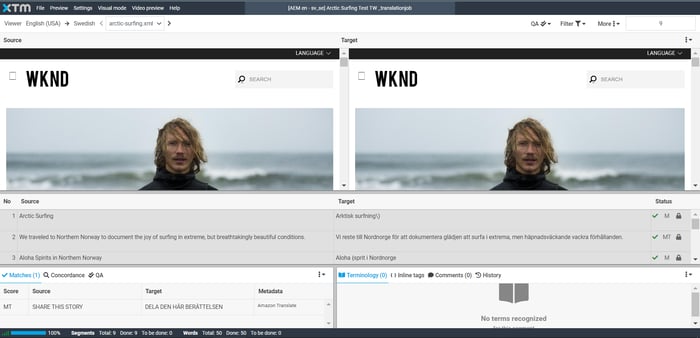
XTM Cloud includes a powerful CAT tool (XTM Workbench) within a complete translation management system, making it ideal for running highly profitable localization projects from start to finish.
Source: XTM
XTM Workbench gives human translators a customizable interface for super-efficient, focused project work, with advanced features like:
- Visual context. The ability to see text in its actual layout reduces errors, keeping projects smooth and translations intact.
- Real-time collaboration with tracked changes. Multiple users can work on files to apply broader skillsets and speed up localization workflows.
- Terminology prompts. The system maintains accuracy and consistency by suggesting approved terms in line with client glossaries.
- Advanced concordance search. Translators can search previous translations for specific terms or phrases, reducing rework to grow efficiency.
What really sets XTM Cloud and Workbench apart? Their seamless connection to the broader XTM ecosystem.
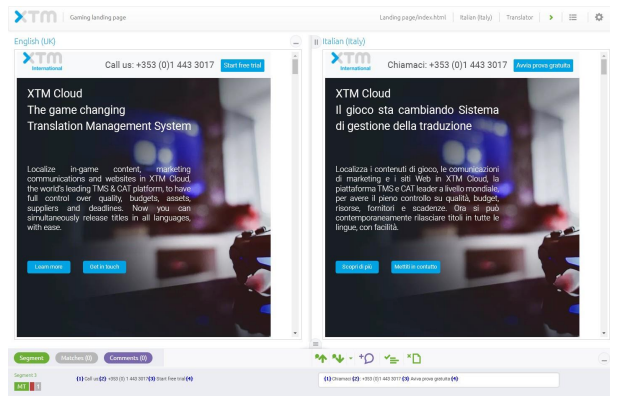
Integration with XTRF for translation business management and Rigi for software localization means you don’t need to juggle apps or move data between platforms.
For example, the UI localization project you kick off in XTM Cloud syncs instantly with XTRF, which handles vendor assignments and invoicing.
Translators then work in XTM Workbench with Rigi’s live previews, translating text directly in the product’s interface. Like this:
Source: XTM
Everything is connected. No switching tools, no re-entering data, no wasting time.
Who XTM Cloud is best for: Mid-to-large enterprises looking to translate at scale without compromising efficiency or accuracy. XTM’s many satisfied customers include global companies with high-volume translation needs, like SAP and Volvo, as well as LSPs of all sizes.
XTM Cloud pricing: Plans typically start at $16,500 annually for unlimited users, projects, templates, and workflows. Our tailored pricing is based on volume and specific requirements.
This might be a bigger investment than some tools require, but it pays off quickly: XTM users have cut localization costs by up to 60%, shortened time-to-market by up to 80%, and boosted output by 250% without adding resources.
XTM Cloud user review:
“I love the fact that [XTM] allows me and my team to have full access to all translation memories and other linguistic assets. It is very intuitive and easy to use, setup was also straightforward. My team and I use it every day, and it has allowed us to switch from a manual copy and paste approach to fully automated imports thanks to its connectors.” — Via G2
2. Across
Across is a German-developed CAT tool with both desktop and server-based versions (the origin is relevant here as support is native in both English and German).
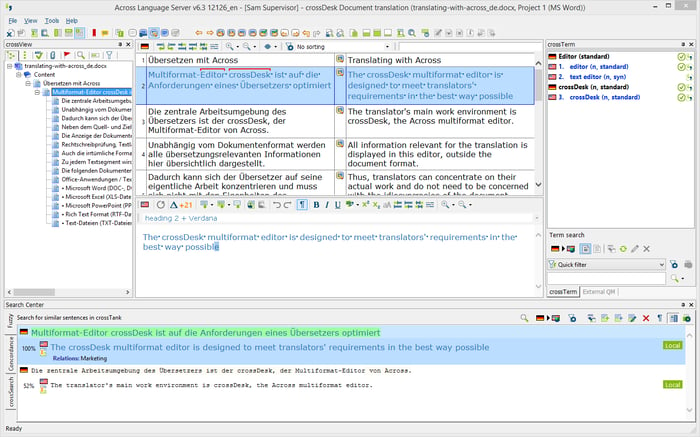
It provides an integrated translation environment called the Across Language Server (ALS), with an informative but busy interface that looks like this:
Source: G2
ALS has all the general functions you’d expect from a CAT tool, meaning it supports translation memory and terminology management, as well as quality assurance. There are also limited workflow automation options and role-based access controls for security.
Speaking of security, Across’s on-premises deployment option keeps sensitive content within the user organization’s infrastructure, aiding regulatory compliance.
That said, you could get the same tight control with more flexibility via a private cloud deployment. XTM has a single tenancy option that separates it from many other computer-assisted translation tools.
Who Across is best for: European organizations with strict data security requirements and those working in regulated industries (especially in Germany and the UK).
Across pricing: Across offers various licensing models, with costs based on required modules and the number of users. Contact the company’s sales team for specific pricing.
Across user review:
“Across has a good project management overview; you can filter the translations by certain users to see what and how much is assigned to which person. The look of the software is quite old and not very up to date. There is also a lot of manual clicking and we missed good connectors and automation options for our workflows.” — Via G2
3. Trados Studio
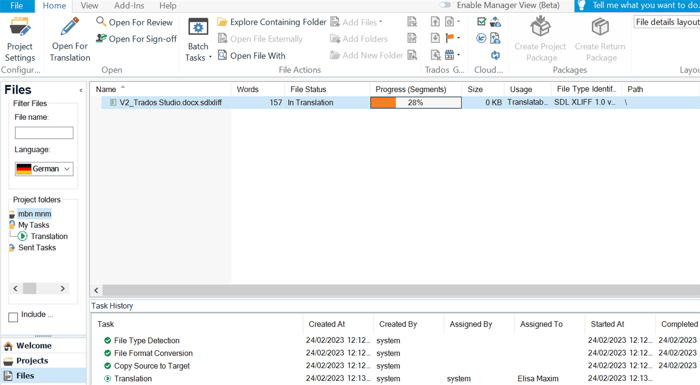
Trados Studio is a mostly desktop-based CAT tool that pairs a busy user interface with detailed customization options, including a jam-packed plugin library and some control over the UI. It’s the latest in a long line of Trados products that began in the 1980s.
Source: RWS
Recent Trados versions offer some cloud functions through the RWS Language Cloud (e.g., file sharing and online collaboration), although a fully cloud-based solution will be more flexible.
Like many of its competitors, Trados has file format support for various document types as well as customizable quality assurance and terminology management features. It also integrates with a range of MT engines, including Google Translate and Language Weaver. However, reviews suggest Trados Studio users might need a separate project management tool for allocating and tracking tasks.
The on-premise version requires local installation and regular updates, so factor this into your time and cost investment. This more tightly controlled approach can help compliance in heavily regulated industries.
Who Trados Studio is best for: Large organizations with established translation teams and detailed customization needs. Those in tightly regulated industries may also benefit.
Trados Studio pricing: Trados’ subscription packages start at $185 per month. There’s enterprise pricing for multi-user deployments, with quotes available on request.
Trados Studio user review:
“[It has a] user-friendly interface and easy filters to display only certain segments. The project management side was completely lacking, at least when our company used the software. We switched to XTM which makes allocating jobs so much easier. With XTM there is no need to send files by mail either, everything is already in the software in the Cloud.” — Via G2
4. memoQ
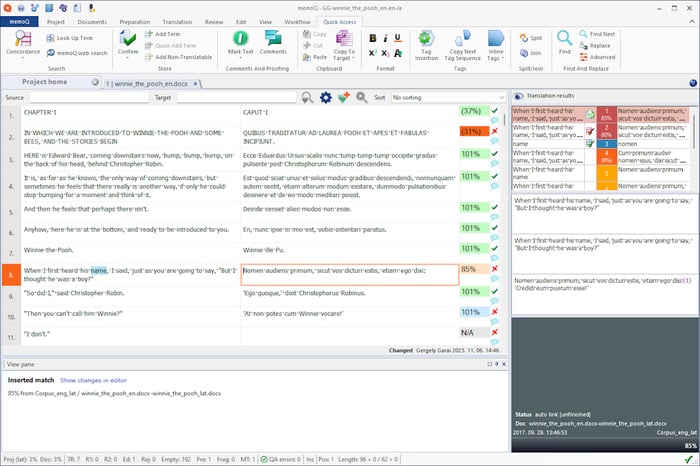
memoQ is a comprehensive CAT tool known for its technical translation capabilities and customization potential.
Source: memoQ
The application’s translation environment, memoQ translator pro, is like many other CAT tools as it aims to speed up work by letting you:
- Reuse previous translations
- Create glossaries with terms
- Add reference materials
- Use predictive typing
memoQ’s LiveDocs feature allows you to store and search through full documents, bilingual files, and uploaded reference materials (e.g., PDFs and DOC files).
The system will then pull helpful matches from these resources when you’re working on something similar. Translating a formal contract? It will pull relevant legal passages or phrases from a previous project. That kind of thing.
MemoQ’s interface has evolved over the years but retains a functional approach that suits technical translation workflows. A lack of visual previews makes it much less practical for UI localization.
Who memoQ is best for: Technical and legal translation teams working with complex file types and lots of legacy documentation.
memoQ pricing: memoQ plans for teams start at approximately $204 monthly (billed annually), with enterprise pricing available upon request.
memoQ user review:
“[memoQ] is very easy to use for basic translation tasks. Also, the customer support is very good. I’ve had one or two urgent issues, and the team has helped me resolve them very quickly. I’d suggest going through customer support to figure out how features work or when dealing with an issue. Finding stuff online can be quite difficult, despite there being relevant information out there.” — Via G2
5. Phrase
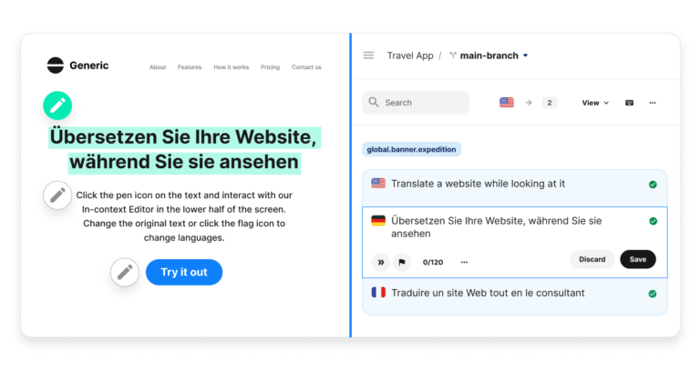
Phrase is a cloud-based CAT tool that operates entirely online through web browsers. It was born from Memsource’s acquisition of Phrase in 2021 — the companies just rebranded under the latter’s name a year later.
Source: Phrase
Phrase’s platform supports real-time collaboration, so multiple users can contribute to the same project without adding extra handoff stages or risking more bottlenecks.
It also has workflow visualization tools and an API for connecting to different development environments and content management systems (CMS).
Being entirely browser-based means Phrase’s dev team can (and do) roll out updates often.
Some enterprise IT teams may prefer more control over how employees and freelance linguists access the system. After all, one study found Chrome to have 2.5 times more vulnerabilities than Firefox, and lesser-known browsers may have even weaker security.
Who Phrase is best for: Remote teams needing an easily accessible browser-based platform with real-time collaboration and strong integration capabilities.
Phrase pricing: Business plans start at approximately $135 per month (paid annually), with enterprise pricing available through Phrase’s sales team.
Phrase user review:
“The platform is very user-friendly and easy to navigate for both project managers and linguists. It comes with all the necessary features a professional translator needs in order to perform their work. [However], sometimes it seems that not all QA issues are captured when running the QA check. This eventually means it’s necessary to run it multiple times until all issues have been registered (and solved).” — Via G2
6. Lokalise
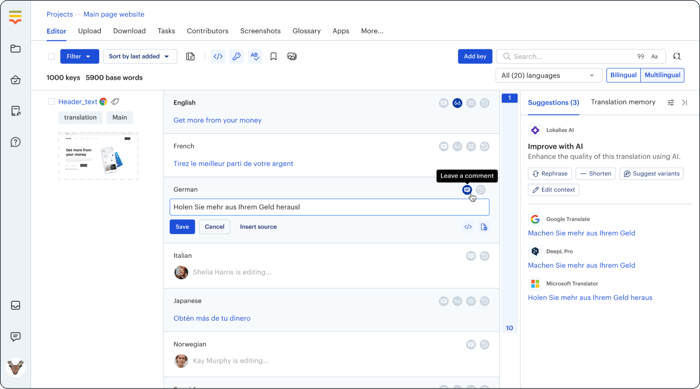
Lokalise is a localization platform with an integrated CAT tool, mainly made for software translation projects
Source: Lokalise
The platform has features for translating app interfaces and other digital products.
For example, its native visual editor — like Rigi’s — shows how translations will appear in the final product interface. It reduces errors to minimize back-and-forth between developers and translators.
Lokalise integrates with developer tool sets and offers automation features for ongoing localization projects. For instance, adding new strings to a codebase can trigger automatic translation tasks, reducing manual handoffs.
Lokalise’s tech focus may not suit teams seeking help with general document translation (i.e., long-form content).
Who Lokalise is best for: Software companies and agile dev teams working on digital products like apps and other software.
Lokalise pricing: Plans start at approximately $120 per month per user (billed annually), with custom pricing for larger implementations.
Lokalise user review:
“Lokalise provides useful data to understand the context of translations and offers robust features for managing Translation Units (TUs). The platform is powerful and well-suited for managing large-scale translation projects. The interface feels very developer-oriented, which can be challenging for translators and editors who may not be familiar with Markdown or HTML.” — Via G2
Optimizing your CAT tool ROI: what to configure first
You’ve chosen the best CAT tool. Management’s on board. Smoother localization projects are so close you can taste them.
But with so many new features in front of you, where do you start?
Getting the setup right from day one is vital. Not just for a smooth implementation but to squeeze maximum value from your long-term investment.
Start with these four simple steps.
Connect your essential tech stack
Maximize your CAT tool’s value by linking it with your existing systems.
Integrations with the apps your team uses every day reduce manual work and improve accuracy to keep projects moving fast.
Assuming you’ve chosen carefully, your tool will have plenty of connectivity options. Prioritize integrations with:
- Your TMS (XTM Workbench is already part of XTM Cloud, saving you the trouble)
- Your primary CMS (e.g., Adobe Experience Manager, Contentful)
- Design and development environments (e.g., Jira, GitHub)
- Marketing automation platforms (e.g., Adobe Marketo Engage, HubSpot)
- Digital asset management tools (e.g., Oracle, Sharepoint)
These connections eliminate duplicate work and add invaluable context to translation projects.
For example, connecting XTM Cloud to GitHub allows video game developer Bigpoint to send projects for translation in one easy step from its authoring tool, easing the team’s workload.
Senior Localization Project Manager Audrey Lepage said:
“The Git Connector was the missing link between our development teams and XTM Cloud. It led to greater automation by enabling our game teams to send us translation tasks containing all of their new content at the click of a button. Manually exporting and importing files is now a thing of the past!”
Automate your most repetitive workflows
Identify and automate the translation processes that happen most often in your organization. You’ll create immediate time savings.
For example, you can configure the best TMS and computer-aided translation tools to:
- Auto-assign content to specific translators based on language pair and subject expertise
- Pre-populate translation memory matches for recurring phrases
- Run automatic quality checks before delivery to catch common errors
Automation helps FARFETCH process a staggering 2.5 billion words of content annually across 15 languages.
Switching to XTM Cloud from a multi-tool model of Word documents, Excel files, and emails allowed the retailer to triple its localization output. All while maintaining total accuracy.
Tighten security without compromising convenience
Strike the right balance between protecting sensitive content and making your system easy to use.
Sure, robust security protects your content and compliance, but overly restrictive settings will only frustrate users and slow adoption.
Balance protection with productivity by:
- Setting up single sign-on (SSO) for easier authenticated access
- Creating role-based permissions that give users exactly what they need to perform
- Enabling two-factor authentication to secure sensitive content without adding friction
Need even stricter data control? You’ll want a private cloud or on-premise deployment.
On-premise CAT tools offer the most protection but require more internal resources to implement and maintain.
Private cloud gives you the benefits of cloud access — real-time collaboration, automatic updates, etc. — but on dedicated servers used only by your organization.
Involve cross-functional teams early
A CAT tool rollout impacts teams beyond localization. Get their input early on so you can configure the system to match their real-world needs.
For example:
- Developers can flag unclear strings in the code using tools like GitHub, so translators get the right context
- Marketers can lay out campaign priorities and brand voice requirements
- Legal teams can help ensure high-quality translations meet compliance standards from day one
And all three can give you more information about the systems they already use, making integration a whole lot easier.
Communication aids adoption, too. Another reason we, a software company, love collaboration so much. When people see the tool solves their pain points — not just your linguists’ — they’re more likely to use and champion it. Everyone wins!
The final word on CAT tools: forget features, focus on fit
If you remember one thing, make it this:
The best CAT tool for your translation projects isn’t the one with the most features or the lowest price.
It’s the one that matches your goals and slots seamlessly into your existing workflows.
Wherever you land, the right choice will transform your localization from a necessary expense into a competitive advantage that accelerates global growth.

Subscribe for More
Lorem ipsum dolor sit amet, consectetur adipiscing elit, sed do eiusmod tempor incididunt ut labore et dolore magna aliqua. Ut enim ad minim veniam, quis nostru.