




.png?width=512&height=512&name=FlowFit_Flavicon%20(1).png)







Your company’s growing fast. Suddenly, you’ve got customers and partners across the world, communicating in different languages and expecting the same from you.
Translation software could be your savior, but you’ll need to do more than pick one basic app to become truly international. You need the right tools for the right tasks.
In this guide, we’ll help you choose the best translation software based on what you’re translating and who’s involved. You’ll also learn when to invest in a more complete localization solution.
Table of contents
- What is translation software used for?
- Types of translation software
- Machine translation tools for quick results
- Software and app translation tools for great UX
- Business translation platforms for growing teams
- When to switch to a more complete translation solution
- Translation software checklist: what to look for
- Get the right tool, make translation a breeze
What is translation software used for?
Translation software generally has one job: to make business content usable in another language without starting from scratch.
The tasks vary, but the goals are always the same: communicating clearly and accurately.
Here’s what that looks like in everyday work terms:
| Example scenario | Why translation software matters |
| E-commerce teams localize product pages across multiple sites | Improves conversion rates across regions |
| Life sciences teams translate clinical trial documents and patient materials | Ensures accuracy and compliance in a heavily regulated market |
| Sales teams request product info from other regions | Prevents miscommunication and delays in sharing key details |
| Marketing teams localize ad copy | Reaches the right people in their native language |
| App support teams adapt knowledge base docs | Makes answers easier to find for a broader audience |
| Software product teams update UI and help content | Keeps user experiences (UX) consistent across markets |
| HR and ops teams publish policies | Ensures internal clarity across global offices |
Some of these tasks are quick, while others need more precision and context. Which is why choosing the right tool is critical.
Types of translation software
There’s no single tool that does every kind of translation work well. Any vendor who tells you otherwise is lying.
We’ve no issue being honest here: XTM Cloud is a stellar choice for translating large volumes of marketing or technical content to a professional standard.
Do you just need to know what your Spanish colleague said in an email? Google Translate can do the job quicker for free.
That’s why it helps to understand what kind of tool best suits your situation and needs.
Most solutions fall into three broad categories:
- Machine translation tools deliver fast results for straightforward text translation. They’re great for quick tasks but lack the project management and quality control functions companies need for consistent, professional output.
- Enterprise translation platforms combine machine translation with human oversight, project management, and workflow automation. These systems — including both translation management systems (TMS) and computer-assisted translation (CAT) tools — are ideal when you need consistent quality across multiple projects and languages.
- App and software localization tools specialize in translating app and software content. The best ones automatically detect new content and show real-time visual previews to stop errors from going live.
Some translation technology providers span multiple categories. For example, XTM products cover enterprise-scale translation (XTM Cloud and XTM Workbench) and software localization (Rigi). All with integrated machine translation.
Here’s a simple tool summary for speedy referencing:
| Software type | Best for | Key features | Examples |
| Machine translation | Quick tasks and basic document translation | Accessibility, immediate results, often free | DeepL, Google Translate, Microsoft Translator |
| Enterprise translation | Marketing content, multi-team collaboration, and consistency | Project and task management, translation memory, terminology management, quality assurance (QA), integrations, security | XTM Cloud, XTM Workbench, Phrase, Smartling, Trados Studio |
| App and software translation | In-app content, user interfaces, and developer collaboration | New content detection, visual previews, developer integrations | Rigi, Lokalise, Crowdin |
This breakdown shows how choosing translation software isn’t just about finding the “best” tool. It’s about picking the right software or a suitable combination for your translation needs and business growth stage.
Machine translation tools for quick results
Machine translation tools are for when speed comes first. They’re ideal for fast, informal tasks, like checking short messages or drafting social posts in unfamiliar languages.
Many of the best machine translation services have free versions, including the three below.
1. DeepL
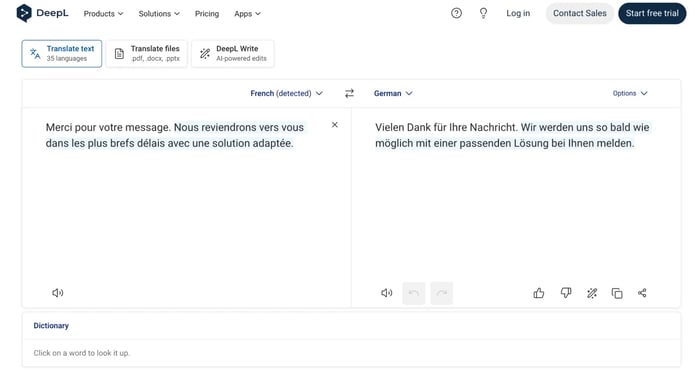
DeepL provides fluent, natural-sounding translations, especially in European languages. You may already know the business-targeting Pro version, but there’s also a free translation service for short texts. The platform has a clean, minimal UI that many non-technical users will like.
Here it is translating a French support message into German:
Source: DeepL
DeepL’s main selling point is that you can quickly translate text between 36 languages without signing up or logging in. Just open the web page and start typing. It’ll figure out the source language automatically and translate into your chosen target language.
Key strengths:
- All languages live on DeepL’s sophisticated LLM for enhanced outputs
- Supports PDF, Word (.docx), and PowerPoint (.pptx) files
- AI-powered DeepL Write helps edit and translate source text in one go
Biggest limitation: Accurate translations for European languages, but limited support for many languages spoken in Africa, South Asia, and Southeast Asia — despite recent additions like Arabic, Chinese, Japanese, and Korean.
Free plan? Yes (web-based with limits)
Paid plans? From $8.74/month for individual users, custom pricing for businesses.
2. Google Translate
Google Translate supports over 240 languages and is built into many Google products, making it the most accessible option for basic translation needs.
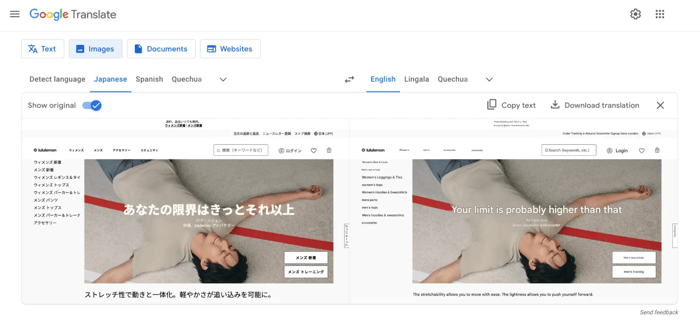
The standalone version works similarly to DeepL: just load the page and start typing. You can also freely upload files and even images for translation. We tested it with some Japanese website content:
Source: Google / lululemon Japan
These direct translations aren’t exactly ready for a multilingual marketing campaign, but they’ll still help you navigate a foreign-language interface quickly. And without spending a dime.
Key strengths:
- Support for over 240 languages (and the list keeps growing)
- Easy access via desktop or mobile app — no payment, no login
- Built into the Google apps and browsers that millions already use
Biggest limitation: Translations sound robotic or too literal in some languages
Free plan? Yes (consumer version)
Paid plans? Businesses can access the more advanced Google Cloud Translation solution, which uses pay-as-you-go pricing from $20 per million characters.
3. Microsoft Translator
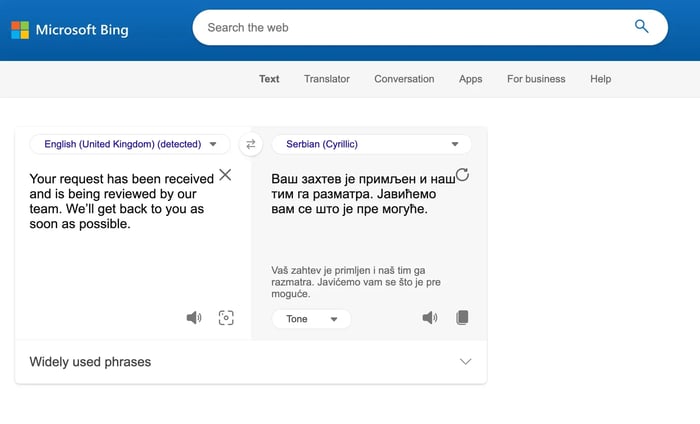
Microsoft Translator is a simple but generally reliable translation tool you can access via API, web, desktop, and mobile. The web version uses the Bing brand though it’s the same tech, and looks like this:
Source: Microsoft
Sitting between DeepL’s fluency and Google’s reach, Microsoft Translator supports around 100 languages and slots neatly into the Microsoft ecosystem. If you’re more Edge than Chrome or Excel than Sheets, this is probably the better choice.
Otherwise, it functions much like the others: load the page and type in your original language.
Another option is to download one of the mobile apps to translate offline, or you can pay for the Azure API and add Microsoft’s translation capabilities to your own app or automation. A bit of dev support will be handy here.
Key strengths:
- Translates speech and imagery, not just text
- Embedded in Microsoft 365 apps, including Outlook for emails and Teams for messages
- Conversation mode enables real-time multilingual meetings
Biggest limitation: Fewer third-party integrations outside the Microsoft ecosystem
Free plan? Yes (consumer version)
Paid plans? Azure Cognitive Services (pay-as-you-go pricing)
Software and app translation tools for great user experiences
App and software localization tools are for translating inside real products, not documents. They solve a lot of the unique challenges developers and linguists face when working together, like seeing exactly how content looks on screen and catching broken layouts before shipping.
The best tools slot seamlessly into developer workflows thanks to user-friendly interfaces and integrations. Try the following options first.
1. Rigi (XTM)
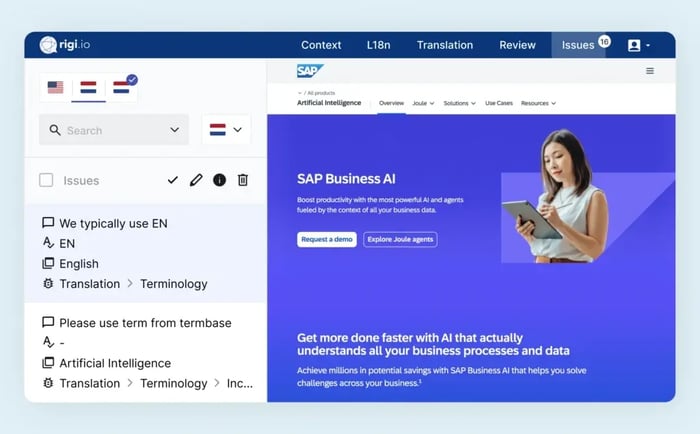
Rigi addresses one of software localization’s biggest challenges: context. Linguists can see precisely how strings appear in their product’s user interface, so they can adjust tone and character count before anything affects users. No guesswork!
Source: XTM
Part of the XTM ecosystem alongside XTM Cloud and XTRF for vendor management, Rigi also plugs into developer workflows and automatically grabs updated UI content. These features make it a great match for agile teams that ship often.
Key strengths:
- In-context previews of software and app interfaces, reducing back-and-forth between developers and professional translators
- Automated string extraction and version control
- Integrations with GitHub, Figma, Jira, etc.
- Proven effectiveness: 90% less developer effort, alongside 70% fewer human translator enquiries and 50% fewer translation errors
Biggest limitation: Most effective paired with a TMS like XTM Cloud
Free plan? No
Paid plans? Enterprise pricing on request.
2. Lokalise
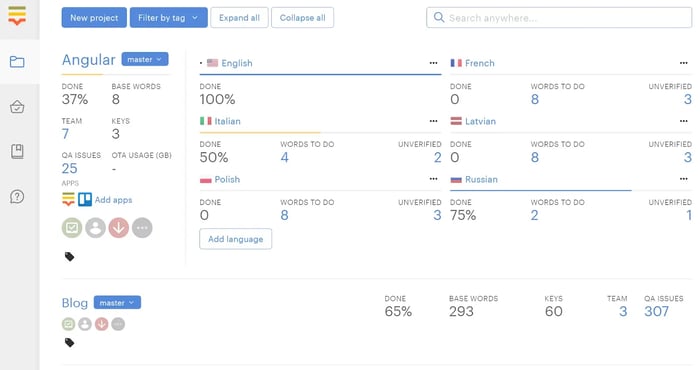
Lokalise is designed to streamline translation for product and engineering teams. It connects directly to codebase and design files to automatically detect new strings. Like Rigi, it shows real-time previews to help users get ahead of layout issues.
Source: Lokalise
Lokalise works well for agile teams because it lets translation run alongside development, not after it. As new content is picked up automatically, translators can work their magic sooner. They don’t need to hold off until features are finalized. That extra coordination means faster releases.
Key strengths:
- Works with Git and command-line tools
- Supports over-the-air (OTA) updates for mobile apps
- Integrates with design tools for smoother handoffs (e.g., Figma)
Biggest limitation: Pricing scales fast for larger teams and lots of projects
Free plan? Yes (limited)
Paid plans? From $120/month.
3. Crowdin
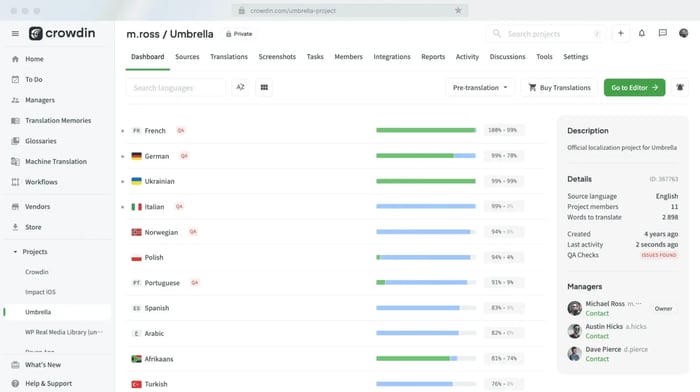
Crowdin can be a practical choice for teams managing lots of updates across web and mobile apps. It satisfies most developer needs, connecting directly to Git repositories and design tools (e.g., Figma) and integrating with CI/CD workflows.
Source: Crowdin
As with Rigi and Lokalise, in-context previews help stop errors from going unnoticed pre-launch. However, some less experienced teams may find the interface a little dense, especially on complex projects.
Key strengths:
- Lots of dev-friendly integrations (GitHub/GitLab, Bitbucket, Azure DevOps, etc.)
- Role-based access controls and collaborative workflows
- Over-the-air updates for mobile apps
Biggest limitation: Advanced automations come at a premium
Free plan? Yes (up to 60,000 hosted words)
Paid plans? From $50/month.
Enterprise translation platforms for growing teams
Enterprise translation platforms suit scale. They bring order to the chaos of juggling lots of language pairs and stakeholders across multiple projects.
The top choices do all the essentials well but also have advanced features for even greater ROI. On top of glossaries and project management, expect mobile apps, tons of helpful plugins, translation process automation, and support for specialist file formats.
Here are three translation management systems that do it all.
1. XTM Cloud (including XTM Workbench)
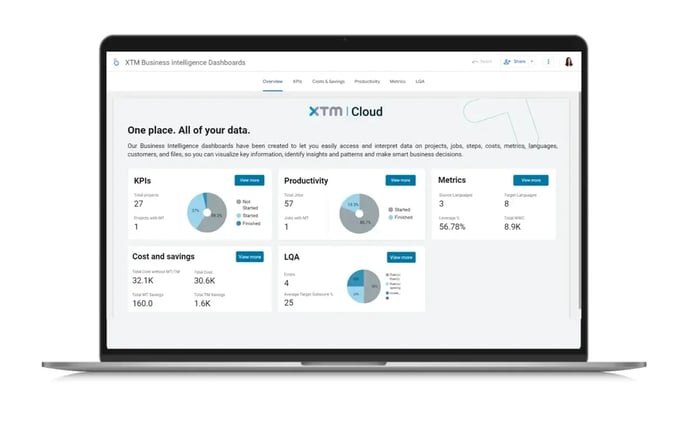
XTM Cloud is an enterprise translation management platform built for teams that need to manage high-volume, multilingual content across markets, vendors, and workflows, all from one environment.
Source: XTM
Cloud-based for easy access and flexibility, XTM Cloud connects with all leading machine translation engines, including Google, Microsoft, DeepL, and SYSTRAN.
That means you get both management power and an in-built CAT tool (Workbench) to deliver high-quality translations every time.
Key strengths:
- Unified platform across translation, vendor management, and automation (XTM Cloud + XTRF + Rigi)
- AI embedded across workflows — quality scoring, routing, and automation driven by performance signals
- Bring-your-own-engine support with full control over AI models and data governance
- Connects with all leading MT engines, including Google, Microsoft, DeepL, and SYSTRAN
- Built-in CAT tool (Workbench) for human translators
- Public cloud, private cloud, and on-premises deployment options
- Real-time cost visibility and word count reporting for project managers
Biggest limitation: Built for enterprise-scale operations, not one-off language translations
Free plan? No
Paid plans? Custom pricing based on needs and volume.
2. Smartling
Smartling is a TMS that focuses heavily on centralized content translation, particularly for companies managing high volumes of e-commerce and marketing content.
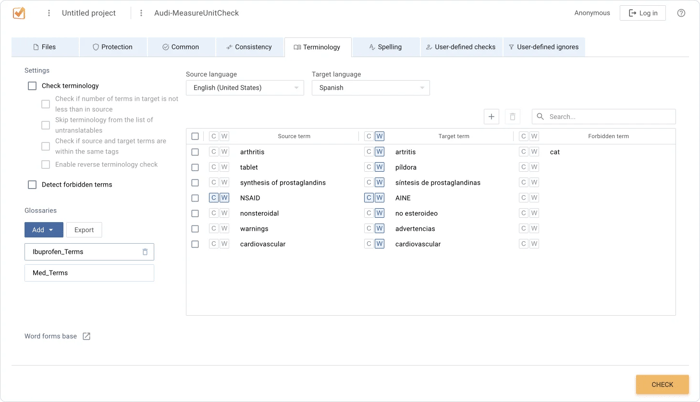
Rather than emphasize code-level integration, Smartling leans more into visual workflows and stakeholder collaboration. There’s WYSIWYG editing and support for proxy-based website translation.
Source: Verifika
Smartling connects with most major CMSs and e-commerce platforms, so it could work for marketing and digital teams keen to manage multilingual content without involving engineers. That said, customizing the platform for complex setups can still need extra support.
Key strengths:
- Proxy translation support for faster website localization
- Connectors for CMSs, e-commerce platforms, and digital asset management (DAM) systems like Bynder and Adobe Experience Manager
- Built-in analytics tools (e.g., dashboards and reporting)
Biggest limitation: Proxy setup and deeper customization can be complex
Free plan? No
Paid plans? Custom pricing based on features and translation volume.
3. Phrase
Phrase is a versatile TMS that blends translation management with some developer functionality. It’s strong in software environments (its website even opens with “Save developers’ time”) but handles some web and marketing localization use cases, too.
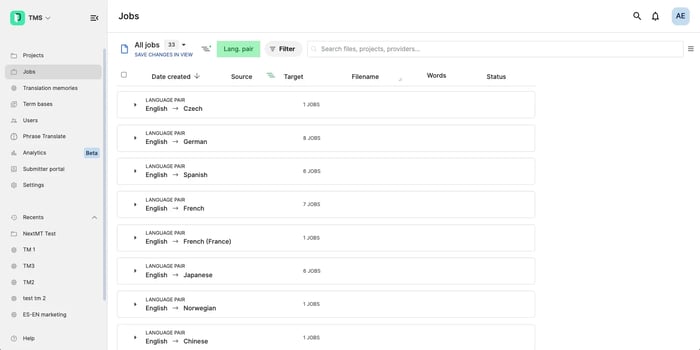
Source: G2
The interface is clean and modern, which makes it accessible for new users and smaller teams getting started with localisation. API support is strong, and there are automation-friendly workflows for teams that want to customise their setup.
Where Phrase tends to show its limits is at enterprise scale. Costs can become harder to predict as volume grows, with reprocessing and usage-based billing adding up. Workflows often require additional tools for vendor management, financial reporting, and QA, which introduces integration overhead.
AI capabilities are primarily editor-focused: useful for rephrasing and tone adjustments, but not embedded across workflow decisions like routing or quality scoring.
Key strengths:
- Built-in translation memory, term bases, and QA
- Phrase Strings for smoother app UI translation
- Support for JSON, YAML, Android, and iOS formats
Biggest limitation: Works well at smaller scale but can become harder to manage and more expensive as complexity and volume grow. Teams with enterprise-level needs around cost control, vendor management, and AI governance may find themselves outgrowing the platform.
Free plan? No
Paid plans? Custom pricing based on usage and integrations.
When to switch to a more complete translation solution
Some tools on this list are simpler than others, because not every team needs a full TMS from day one.
However, when translation work starts piling up or you notice quality issues slipping through to damage brand perceptions, it’s a sign that you’ve outgrown the basic options.
It’s time for an upgrade if:
- You’re juggling more languages, markets, or content types than your current setup can handle. DeepL doesn’t support Hindi and its 600+ million speakers, for instance.
- Translators are asking the same questions over and over, or repeatedly correcting the same mistakes in post-editing.
- Your internal team is spending too much time on manual tasks, like copying and pasting content for localization.
- You’re always missing deadlines because translators are playing catch-up with designers and developers.
This is where the best business translation software can make a real difference. Instead of duct-taping separate tools together, you get a centralized space to manage and optimize translation processes.
“Without [localization] technology acting as a hub around which everything revolves, the [translation] process becomes deeply inefficient. With this inefficiency in place, global expansion and, ultimately, digital transformation makes little sense. That is where solutions like XTM Cloud come in as a key part of the content technology stack.” - Ian Evans, CEO, XTM
That centralization cuts wasted search time. One study found that knowledge workers at large companies (10,000+ employees) spend 102 minutes a day looking for information. At a whopping business cost of $7 million per year.
The big names in MT are still crucial ingredients. Most strong TMS platforms integrate leading MT engines and apply their own algorithms to deliver quality translations alongside advanced features like QA and TM.
For example, XTM Cloud connects to all three MT options in this guide, as well as to CrossLang, SAP Translation Hub, KantanAI, and others.
Translation software checklist: what to look for
We’re not going to pretend this guide is exhaustive. There are other options.
Comparing the hundreds available is daunting, but it needn’t be if you ask and honestly answer these questions each time:
| Question | Why it matters |
| What types of content are you translating? | Legal documents, UI text, help articles, SEO and marketing copy all need different levels of control and speed. Not to mention the changes in tone. |
| How many people are involved in the translation process? | The more stakeholders, the more valuable centralized workflows and access permissions become. |
| Do you need real-time collaboration or visual previews? | These are essential for any projects where layout and space constraints matter (e.g., product UI, websites, etc.) |
| Is translation a one-off project or an ongoing necessity? | TMS and software localization tools are better for ongoing translation needs (i.e., continuous localization) because they include translation memory and terminology management. |
| Do you need to track quality or version history? | Most simple MT tools won’t keep track of your projects. If consistency and compliance matter, a TMS is the way. |
| Are you working with professional translators? | Some tools are made for linguists (and by linguists). Others are optimized for automation or hybrid workflows. They’re different approaches. |
| What systems do you already use? | Think CMS, code repo, design tools, marketing automation, or customer support systems. Check app and plugin marketplaces for all the options. |
Ultimately, what matters most? Speed, cost, quality, scalability, or all of the above? Let priorities shape your shortlist.
If DeepL or Google Translate does everything you need, great. Keep your money. But if their simplicity restricts your growth, you can justify investing in the efficiency and quality gains of a decent TMS or software localization platform.
Get the right tool, make translation a breeze
The moral of the story is that what works for a small support team answering overseas tickets won’t cut it for an enterprise localizing product interfaces in 15 languages. They’re different worlds with different needs.
The good news? You don’t need to wildly guess the best translation software for your business, nor waste money trying them one at a time.
Start with what you’re translating, who’s involved, and how fast things need to move. Then choose the tool or combination that fits that reality.

Keep up with what’s shaping localisation
Join our newsletter for real-world guidance on localisation strategy, AI-powered translation, and managing multilingual content at scale.